
Step-by-step
You logged in to Agentpunkt, the place where you can find agents for your industry. In this guide, you will learn how to set up, access, and start collaborating with your Legalpunkt AI legal agent to streamline your legal operations.
How the Solution Works
Legalpunkt is a powerful highly intelligent AI-powered legal ecosystem designed to act as your autonomous legal co-counsel. We tirelessly tuned, trained, and perfected it, so this agentic system could help lawyers and businesses draft agreements, audit contracts, track court cases, execute deep research, and manage case files with ease that was never possible before.
Accessing and using Legalpunkt follows a simple flow:
- Log in or Register: Create an account or log in to your profile on the Agentpunkt AI Agent Marketplace.
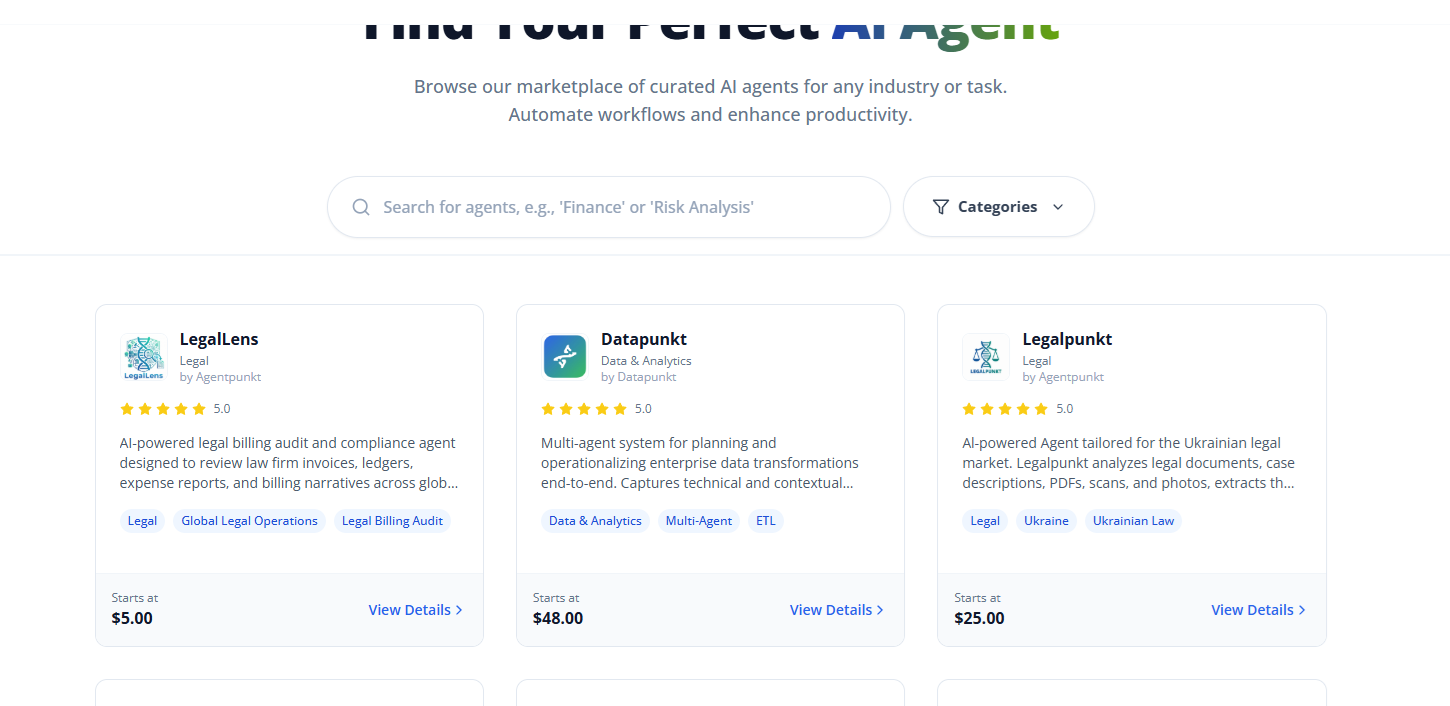
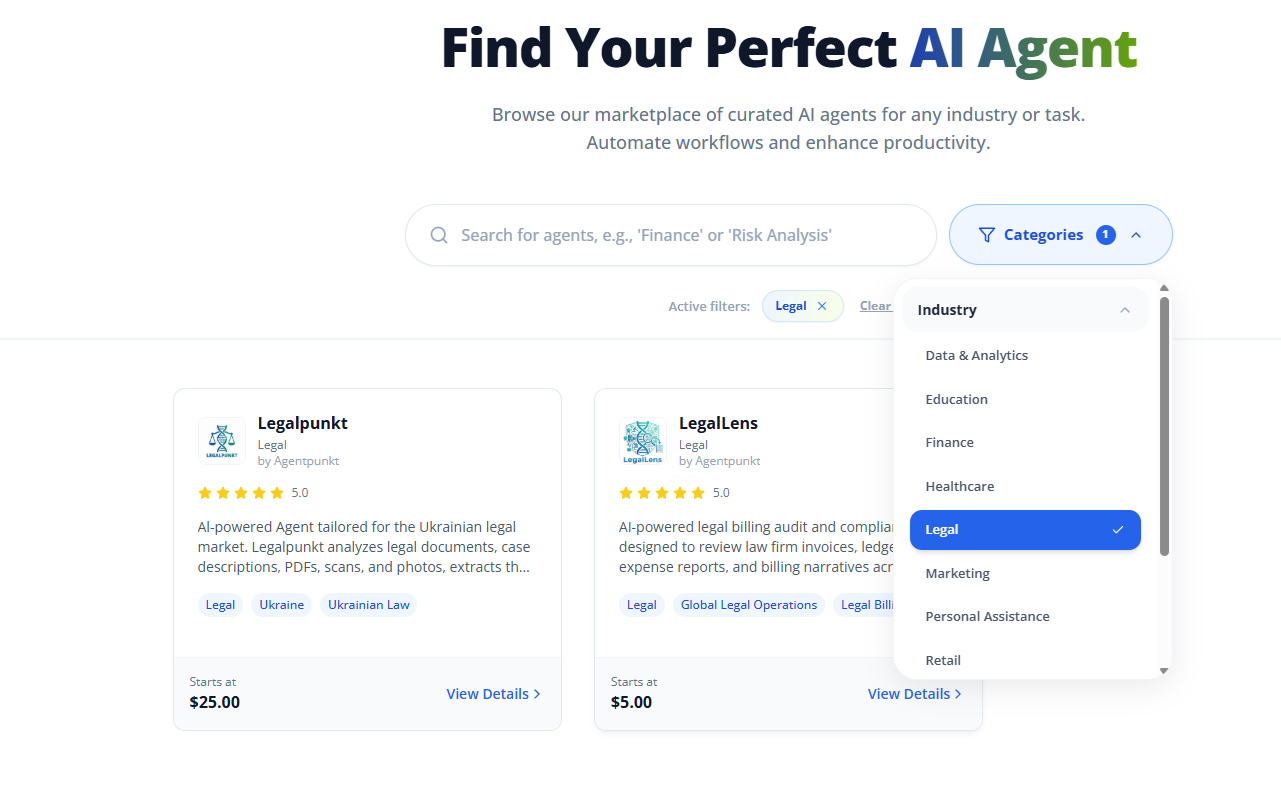
- Find and Purchase the Agent: Locate the Legalpunkt agent on the home page or under "Legal" category, and subscribe to it.
- Navigate to Hired Agents: In the top header of the site, click on the Hired Agents tab. This is your personal control panel for all active agents.
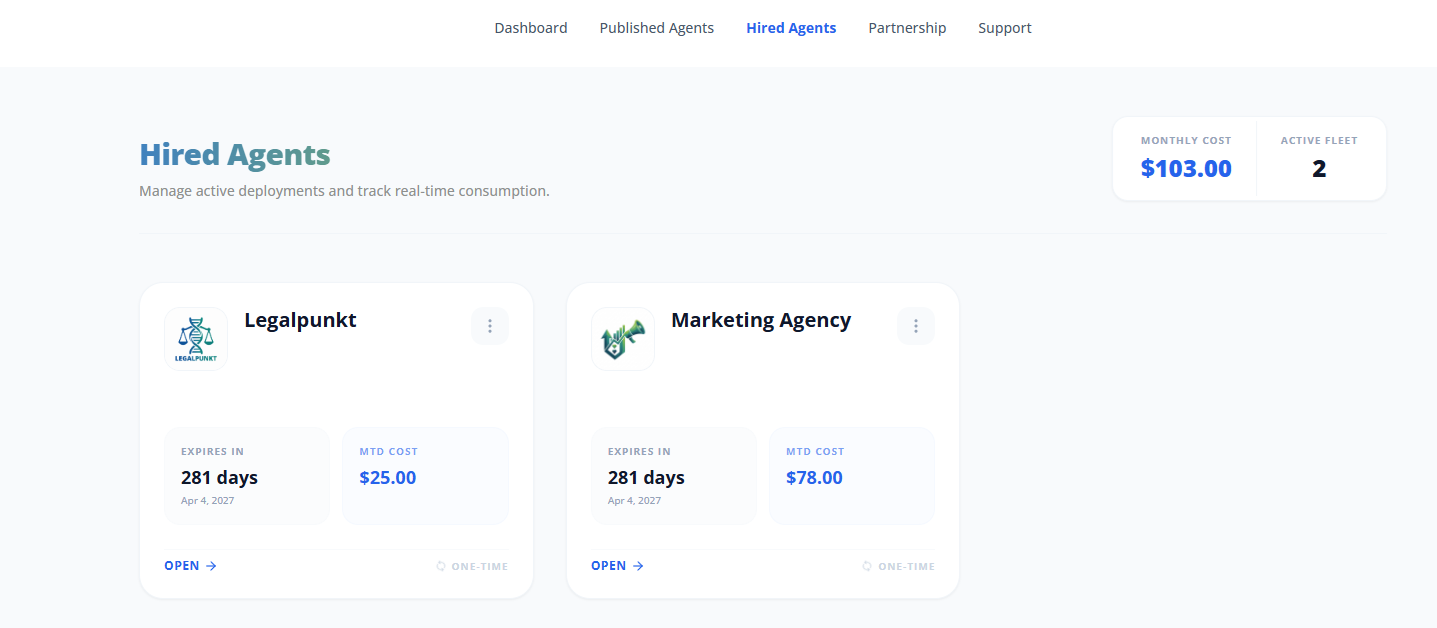
- Access the Workspace: Find Legalpunkt in your list of hired agents and click on it to open its custom workspace.
- Start Working: Once you open the project or the workspace, you can start chatting with your agent in the sidebar right away! If you have a serious case and/or a lot of context, we recommend creating a dedicated LegalProject. Each project features a dedicated Context tab where you can upload all relevant case documents, scanned files, or contracts to focus the agent's research and audit capabilities.
What You Need Before Getting Started
To get the most out of Legalpunkt, ensure you have completed the following steps:
- Active Agentpunkt Account: Ensure you are logged in. We support Gmail, Microsoft, and GitHub integrations for instant account regetraion & login. You can also create an account manually with specific mail and password.
- Active Legalpunkt Subscription: The agent must be active in your Hired Agents dashboard.
- Case Documents: Gather PDF scans, contracts (e.g., NDAs, MSAs), court records, or emails you need to process.
Want to get more details?
If you are intereseted in learning more about our platform, what it can do, and how it can trasnform your business - please feel free to contact our sales team info@agentpunkt.com and we will be happy to assist you.
Key Concepts and Navigation
LegalPunkt is not just an interface; it is a comprehensive agentic ecosystem engineered specifically for the highly complex nuances of the legal framework (including direct, seamless integration with Єсуд) alongside robust global extensions.
When you open the LegalPunkt workspace, you will interact with three main agentic pillars, specialized project workspaces, and customizable settings.
I. The Three Core Agentic Modules
1. LegalPunkt Agentic System
The Ultimate Legal Conversationalist
This is your direct communication line with your AI co-counsel - an expert in law, and it's engineered specifically for legal professionals. Chat is capable of drafting, summarizing, and reasoning through complex legal arguments.
- Persistent & Context-Aware: The chat operates as a convenient, collapsible right-hand panel that stays with you across different tabs, ensuring your stream of thought and working context remain unbroken.
- Skill-Enabled: The Agentic System can immediately pivot into deep tasks when specific legal skills are activated.
2. LegalSearch
Next-Gen Semantic Research Across Jurisdictions
Say goodbye to rigid keyword searches. LegalSearch uses advanced AI semantics to let you describe complex legal scenarios in plain, natural language.
- Global & Local Scope: Instant search capabilities across precedents, court rulings, and laws in Ukraine (including official registers), the United Kingdom, the European Union, and the United States.
- Smart Filters: Easily narrow down vast results by jurisdiction, date, case type, or court level to find the exact smoking gun or precedent you need.
3. Projects (Your Legal Workspaces)
Every legal matter or client case is organized into an isolated, secure container called a Project. This strict containerization ensures zero data leakage between different clients, maintaining absolute confidentiality while focusing the AI's cognitive search boundaries strictly on the files within that project.
II. Inside Your Project Workspace (The 7 Powerhouse Tabs)
Each Project comes equipped with a suite of 7 specialized tabs designed to automate manual tasks and accelerate your productivity:
Dashboard: A visually stunning overview featuring an AI-generated project summary, active milestones, metrics, and a chronological legal timeline to keep you entirely on top of your case.
Context: The project's dedicated AI knowledge base. Here, you can view, organize, and manage files and folders. You can track whether a document has been successfully indexed by the AI and trace its source—whether uploaded manually, sync'd from Google Drive, SharePoint, OneDrive, or directly imported from Єсуд.
Tabular View: Compare multiple massive contracts at once and extract all needed, necessary, and required info using our highly customizable, dynamic spreadsheet matrix. Built on a user-driven, "empty-state-first" model, you maintain total ownership over your data extraction:
- Workbook Templates: Instantly launch audit sprints by applying pre-configured templates from your organizational library (such as Due Diligence Audits (M&A), NDA Reviews, or Commercial Lease Audits).
- Custom AI Columns: Add target parameters (Text, Amount, Date, or Boolean) and write a natural-language AI instruction. LegalPunkt can even auto-generate optimized instructions for you based on the column name.
- Three-Panel Unified Review: Double-click any row to open our leading-edge split-screen validation editor. The Left Panel lets you navigate your files; the Middle Panel details extracted values, confidence scores, reasoning, and human-in-the-loop actions (Risk Flags, manual overrides, and locking verification states so future AI pipeline runs won't overwrite verified data); and the Right Panel acts as an interactive PDF viewer that automatically scrolls to and highlights the source text in warm amber as soon as a parameter is clicked.
- Project-Wide Collaboration: Share the entire LegalProject to collaborate on the live matrix with partners in real-time (as individual Tabular sessions cannot be shared separately).
Artefacts: Manage AI-generated briefs, memos, letters, and filings, or upload your own. This tab features a rich, native editor (similar to Google Docs or MS Word) for seamless adjustments. Best of all, you can synchronize and transmit these files directly to the Ukrainian electronic court system (Єсуд) with a single click.
Contracts: Open contracts in our native editor to experience Inline AI Risk Highlighting—an exclusive, industry-leading feature that automatically flags critical, high-risk, and medium-risk terms in real time.
Billing: Experience hands-off invoice management. Our passive AI-led tracking system automatically compiles your legal activities, drafts expected invoices, and calculates billable hours. You can easily adjust hours, toggle multiple currencies (USD, EUR, GBP, UAH), download draft invoices, or even upload and challenge opposing counsel's invoices. Once verified, simply click Approve & Claim.
III. Settings & Platform Orchestration
Tailor the LegalPunkt ecosystem to match your firm's workflows through the control panel:
- Enable Legal Skills: Empower your agent with specialized, high-level skills, including GDPR Reviews, M&A Due Diligence, or local regulatory audits.
- Connect External Tools: Seamlessly connect your agent to your existing workflow tools, including Gmail, Office 365, Google Workspace, and Microsoft SharePoint.
- Omnichannel Integration: Deploy your LegalPunkt AI agent directly into your corporate communication channels, such as Microsoft Teams, WhatsApp, or Telegram, and access it on the go with our native Mobile App.
- Playbook Templates: Speed up compliance setups by importing pre-configured playbook templates for standard legal structures.
NOTE
All user-uploaded data, corporate guidelines, and conversation history are completely secure and are never used to train public or base AI models.
Ready to Begin?
- Go to the Agentpunkt Marketplace and purchase Legalpunkt.
- Open your Hired Agents tab to launch the workspace.
- Start Chatting: You can start chatting with the agent right away in the right-hand panel!
- Organize Complex Cases: If you have a serious case and/or a lot of context to process, create a dedicated project. Use its Context tab to upload all relevant contracts, records, and scanned files so the AI co-counsel has full access to the case background.
- Check out the Legal Agentic System guide to understand how to leverage its capabilities and find prompting tips.
If there’s anything you would like to discuss regarding this agent, and its purchase - please contact our marketing team info@agentpunkt.com.