
Interoperability & Configuration
Legalpunkt operates on a foundational philosophy that AI should adapt to your practice—not the other way around. Rather than functioning as a rigid, monolithic conversational chatbot, Legalpunkt is a highly configurable, agentic operating system designed to fit the precise workflows, jurisdictions, and standard operating procedures of your legal department or firm.
This guide details how to customize and orchestrate the platform's capabilities to align with your active matters. By understanding the modular architecture of Legalpunkt, you can dynamically configure active workflow skills, toggle real-time search sources, leverage layout-aware vision models for non-digital files, and handle unlimited volumes of case files. Ultimately, this design gives you full, precise control over the logic, context, and data pipelines powering your AI co-counsel.
A Modular, Plug-and-Play Architecture
Legalpunkt operates as a composable system: every major capability—from contract review skills to jurisdictional search engines—can be independently enabled, disabled, or reconfigured without affecting the rest of the platform.
This means your firm can start with a focused deployment (for example, activating only NDA review and Ukrainian court search) and progressively expand into additional jurisdictions, document types, and workflow automations as your needs evolve. There is no rigid, all-or-nothing commitment.
Why This Matters for Legal Teams
- Tailored Compliance: Activate only the jurisdictions and document types relevant to your current matters. A firm handling exclusively domestic Ukrainian litigation does not need EU regulatory modules running in the background.
- Controlled Rollout: Introduce capabilities team by team or matter by matter, allowing associates to gain confidence with the platform incrementally.
- Cost & Resource Efficiency: Disabling unused modules reduces noise in your workspace and ensures the system allocates its full reasoning capacity to the tasks that matter most.
Multi-Modal Input & OCR Processing
Legal practice is rarely limited to pristine, machine-readable digital text. Corporate transactions, litigation discovery, and historical archives regularly involve scanned files, low-contrast photocopies, handwritten annotations, or photographed agreements. To bridge the gap between physical evidence and digital intelligence, Legalpunkt incorporates a layout-aware multi-modal vision pipeline.
Rather than treating document ingestion as a standard text extraction task, Legalpunkt processes visual elements alongside textual data:
- Layout Reconstruction: The OCR engine doesn't simply extract words; it visualizes and reconstructs the structural topology of the page. This preserves hierarchical bullet points, multi-level tables, footnote numbering, and signature blocks.
- Legacy Document Integration: By transforming low-quality scans and images into searchable text vectors, legacy contracts and court filings are integrated directly into the workspace's active reasoning loop.
This multi-modal vision pipeline is a core, configurable aspect of the platform. You can toggle how complex scans are handled depending on the speed and precision requirements of your active project.
Infinite-Scale Context Management
A critical limitation of traditional legal AI systems is their reliance on the model's standard context window. Most platforms approach large dossiers by "stuffing" every contract, brief, and deposition transcript directly into the active LLM prompt. This approach is highly inefficient—it increases latency, incurs excessive token costs, degrades system response quality, and frequently leads to severe information loss or hallucination.
Legalpunkt eliminates these constraints. Powered by Agentpunkt's proprietary context-handling architecture, the system is designed to handle context of any size. Rather than overloading the active LLM window with raw files, Legalpunkt employs an advanced context management framework. This framework holds, indexes, and queries entire transaction directories or litigation dossiers without triggering the LLM's core context window until relevant evidence is isolated.
This decoupled, intelligent context architecture offers major advantages:
- Arbitrary Context Scale: Ingest thousands of pages, complex corporate structures, or complete litigation histories without running into token capacity limits.
- Precise Information Retrieval: The context engine dynamically extracts only the exact, semantically relevant paragraphs, sections, or defined terms needed to resolve your query, delivering high-fidelity context to the model on demand.
- High Performance: By preventing context window bloat, the system minimizes processing latency, lowers token overhead, and maintains superior reasoning accuracy over long-term research sessions.
TIP
Deep Dive into Memory Architecture To explore the technical foundations of context storage, memory routing, and vector management in agentic workflows, read the book Context Management in Agentic Systems. It provides a comprehensive analysis of the concepts that power our platform's scale-independent capabilities.
Configuring Skills & Playbooks
Two of the most powerful configuration levers in Legalpunkt are Skills and Playbooks. Both can be toggled on or off at any time from the workspace settings, giving your team precise control over how the system analyses, drafts, and audits legal materials.
Skills: Activating Domain-Specific Expertise
Skills are modular, purpose-built capabilities that extend the agent's analytical repertoire. Each skill encapsulates a structured methodology for a specific legal task—be it a Commercial Contract Review, an NDA Audit, a Privacy Compliance check, or a Legal Risk Assessment Matrix.
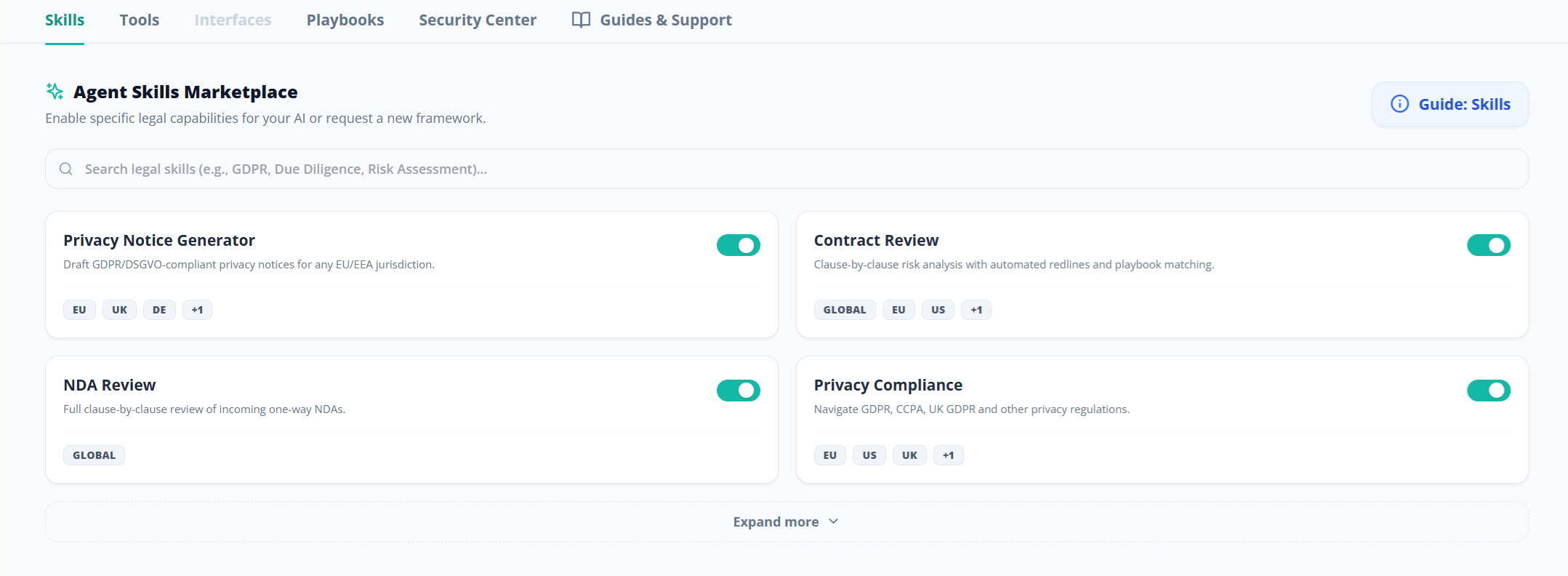
- Toggle On/Off: Navigate to your workspace Settings → Skills panel. Each available skill is listed with a clear activation switch. Enable only the skills your team needs for active matters.
- Immediate Effect: Once a skill is activated, the agent automatically applies its review framework to relevant tasks. Deactivating a skill removes it from the agent's active toolkit instantly—no restart or reconfiguration required.
- Expanding the Library: As your firm's practice areas grow, new skills can be activated from the directory without disrupting existing workflows.
Playbooks: Enforcing Institutional Standards
Playbooks encode your firm's specific contractual policies, risk tolerances, and clause preferences into structured rulesets that the agent follows during document review.
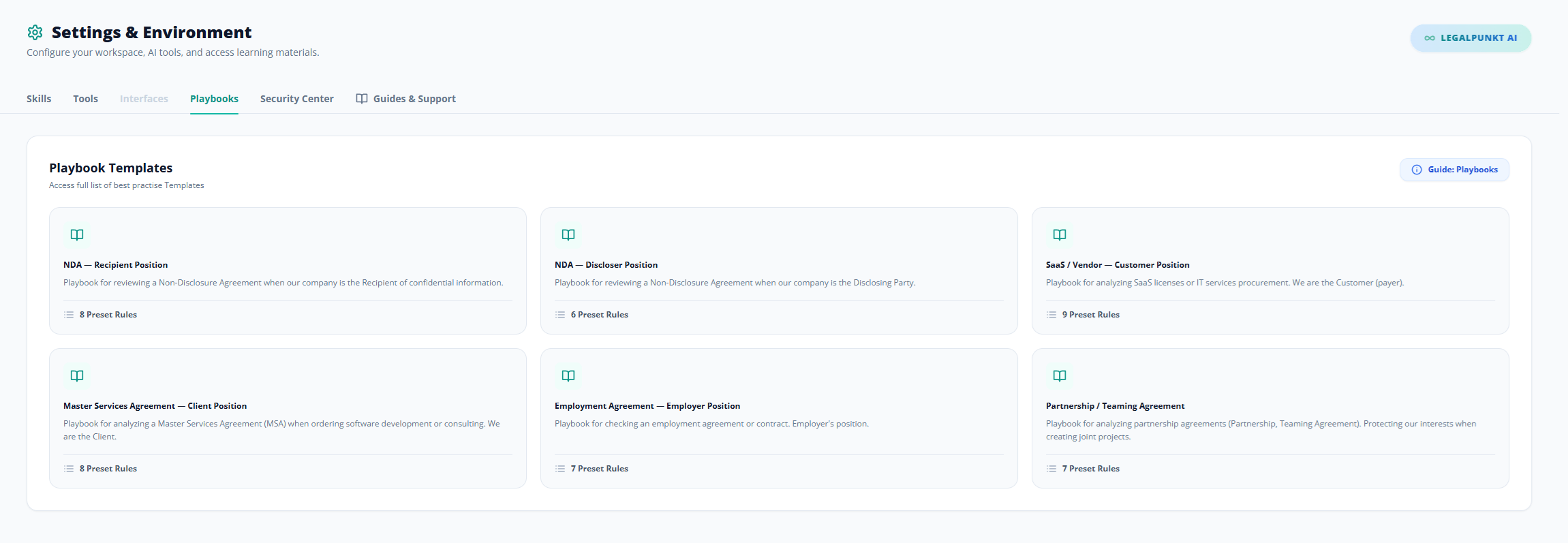
- Toggle On/Off: Access Settings → Playbooks to view and manage your active playbooks. Enable a playbook to instruct the agent to measure documents against your firm's defined standards; disable it when a matter requires a different analytical baseline.
- Layered Application: Multiple playbooks can be active simultaneously. For example, you might run a general corporate governance playbook alongside a client-specific risk tolerance playbook, and the agent will reconcile both during its review.
Activating Search Sources During a Session
One of the distinguishing features of the Legalpunkt workspace is the ability to dynamically select your research sources in real time, directly from the chat interface. Rather than being locked into a single data pipeline, you choose exactly where the agent looks for answers on a per-query basis.
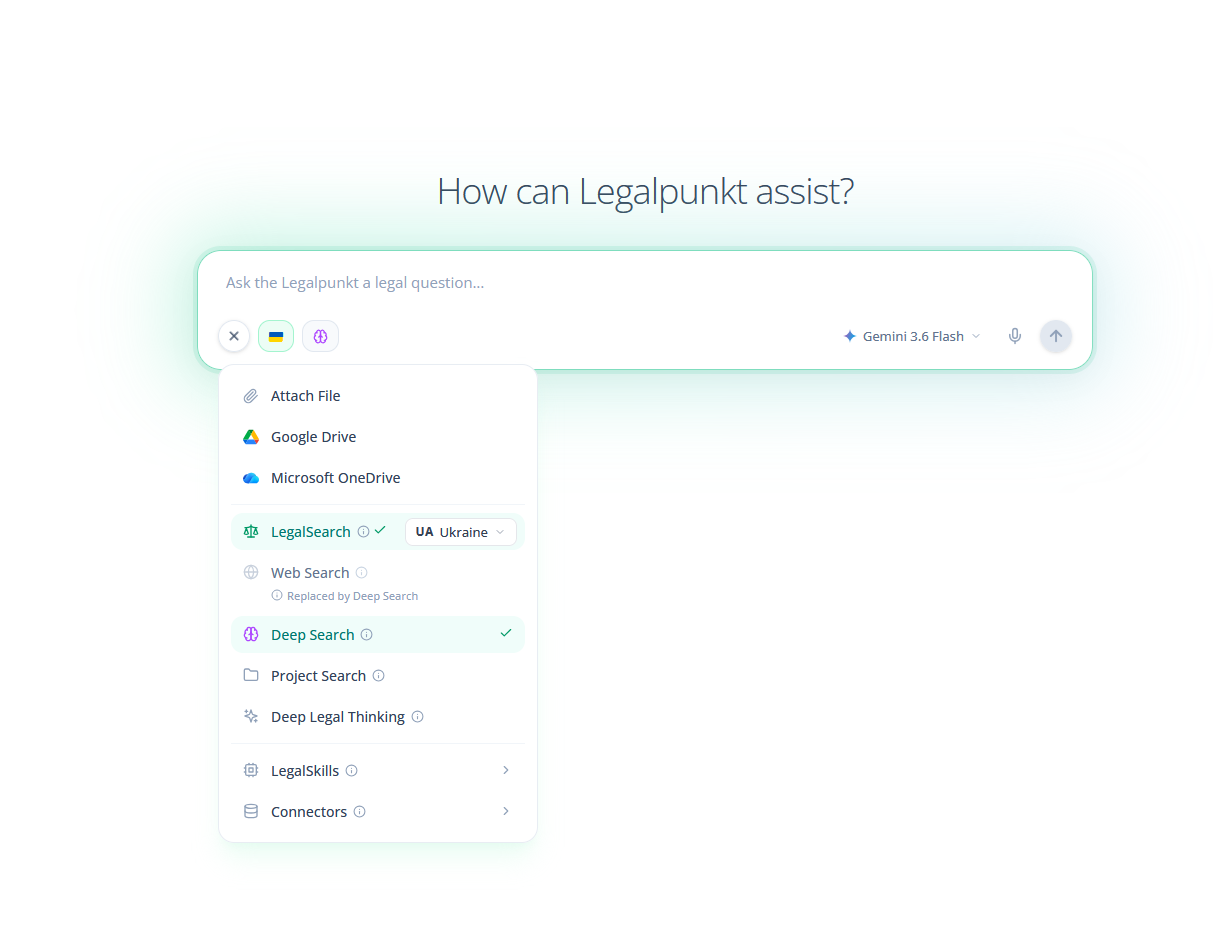
Available Search Sources
During any chat session—whether in Global Chat or a Project workspace—click the Plus (+) icon in the input bar to open the Sources menu. From there, you can activate:
- LegalSearch: Connect your query to national court registries and judicial databases. Once enabled, you can select specific jurisdictions (Ukraine, United Kingdom, United States, European Union) to narrow the scope of your search precisely to relevant court precedents.
- Deep Search: Direct the agent to query our curated registry of official governmental portals, ministries of justice, and regulatory gazettes across supported jurisdictions—ensuring zero-hallucination statutory intelligence (enabled by default for Pro+ subscribers).
- Web Search: Query broad public search engines for live news, market commentary, and public company disclosures.
- Project Search: Restrict the agent's retrieval exclusively to files indexed inside your active Project Context—ideal when you need answers grounded strictly in your uploaded case materials.
- Deep Legal Thinking: Engage the deliberative Gemini 3.1 Deep Think reasoning engine for complex inquiries that require multi-stage planning, adversarial stress-testing, and comprehensive memorandum drafting.
Combining Sources for Precision
These sources are not mutually exclusive. You can activate LegalSearch alongside Project Search in a single query, instructing the agent to cross-reference your uploaded contracts against live court precedent. Or combine Deep Search with Deep Legal Thinking to produce a thorough, zero-hallucination memorandum enriched with the latest official regulatory directives.
TIP
Best Practice: For high-stakes advisory work, activate LegalSearch with the relevant jurisdiction and Deep Search simultaneously. This ensures the agent grounds its analysis in authoritative judicial precedents while validating conclusions against official statutory and regulatory repositories.
Best Practices for System Interaction & Prompting
To maximize the system's reasoning capabilities and secure the most accurate legal deliverables, you should structure your queries with the same care and precision you would use when briefing a human associate. High-fidelity legal analysis is a direct product of clear instructions, comprehensive context, and explicit constraints.
1. Apply the Fact-Goal-Jurisdiction Framework
When initiating any complex legal task or deep legal thinking query, structure your prompt around three essential pillars:
- Facts: Detail the exact background, dispute particulars, commercial context, or relevant parties.
- Goal: Define the precise output format and objective (e.g., a structured risk matrix, a draft claim response, or a comparative regulatory analysis).
- Jurisdiction: Specify the governing laws, regional regulations, court tiers, or international frameworks that should anchor the system's reasoning.
Prompting Examples:
- Ineffective Prompt:
"Research the rules for terminating a SaaS contract."
- Effective Prompt (Fact-Goal-Jurisdiction):
"Research the statutory and judicial rules for contract termination due to material breach under Ukrainian commercial law. Our counterparty has failed to deliver the final software build for 90 days. We need to understand:
- What constitutes a 'material breach' in recent Supreme Court commercial resolutions?
- What formal notices are required before termination is considered legally effective?
- Can we recover advance payments under Article 612 of the Civil Code?"
2. Define Roles and Personas
Establishing a specific legal perspective focuses the system's reasoning and customizes the tone of the output to suit your target audience:
- Example: "Act as a senior UK intellectual property solicitor reviewing a software licensing agreement for potential copyright liabilities."
- Example: "Adopt the persona of a corporate compliance officer auditing internal timesheets against regional labor standard regulations."
3. Enforce Negative Constraints
Explicitly instruct the system on what to exclude, ignore, or avoid. This narrows the scope of search and prevents irrelevant jurisdictional noise:
- Example: "Perform this compliance audit focusing strictly on the EU GDPR. Ignore California Consumer Privacy Act (CCPA) provisions and do not reference US federal court rulings."
- Example: "Summarize the dispute points. Do not include any analysis of the indemnification clause as that is being handled separately."
4. Execute Iterative, Step-by-Step Refinement
For complex workflows, break your tasks into logical, sequential queries. This allows you to evaluate intermediate findings and adjust instructions as you proceed:
- Step 1: Ask the system to extract and summarize key risks or discrepancies in an agreement.
- Step 2: Review the output, select the most critical issues, and ask the system to draft amendment clauses.
- Step 3: Instruct the system to format those clauses into a final, client-ready contract addendum.
5. Enforce Output & Formatting Constraints
Ensure the deliverables are ready for direct inclusion into your drafts or client presentations by specifying structure, length, and style:
- Structural Formats: Request markdown tables for comparative analysis, numbered checklists for procedural steps, or bold headers for readability.
- Length Controls: Set strict bounds (e.g., "Limit the summary to exactly three paragraphs" or "Provide a one-page executive overview").
- Style Guidelines: Tailor the language to the reader (e.g., "Write in plain English for non-legal business stakeholders" or "Use formal, citation-heavy legal terminology suitable for a court submission").
6. Incorporate Workspace Context & Playbooks
- Leverage Project Context: For matter-specific files, ensure documents are fully indexed in your project's Context tab. This ensures the system grounds its analysis in your internal materials rather than general web databases, eliminating the risk of factual errors.
- Integrate Institutional Playbooks: Connect your organization's custom playbooks in the Settings tab. This guides the system to analyze agreements against your institution's specific risk tolerances and preferred clause libraries, highlighting variances automatically.