
Deep Search
Deep Search is an advanced regulatory and governmental intelligence capability built directly into the Legalpunkt aOS workspace. Engineered for corporate counsel, regulatory affairs specialists, and litigation attorneys, Deep Search provides a dedicated, high-precision scanning pipeline that monitors, indexes, and queries official public-sector portals across all supported jurisdictions.
Unlike unconstrained public web searches that retrieve unverified articles, outdated legal blogs, or commercial forum commentary, Deep Search restricts its retrieval to a strictly curated registry of authoritative governmental and regulatory endpoints. By pairing systematic official domain indexing with deep multi-page structural analysis, Deep Search eliminates hallucinations and delivers verifiable, audit-proof legal intelligence.
The Need for Deep Search in Enterprise Legal Practice
Legal and compliance professionals cannot rely on probabilistic web chatter or unverified third-party summaries when advising clients or preparing court submissions. Regulatory obligations, administrative gazettes, statutory amendments, and ministerial decrees demand exactitude.
Key Differences & Zero-Hallucination Evidentiary Standard
- Curated Government Registers: Rather than sweeping the open internet, Deep Search queries a defined catalog of verified governmental domains, ministries of justice, administrative registers, financial regulators, competition authorities, and legislative gazettes.
- Continuous Synchronization & Live Indexing: Our data pipeline continuously crawls, monitors, and updates these official portals, ensuring that newly enacted statutory amendments and regulatory circulars are immediately accessible.
- Elimination of Hallucinations: Because every retrieved fact is anchored directly to an official public-sector repository, Deep Search prevents the hallucinated citations, misattributed case numbers, and outdated provisions that frequently plague open commercial search engines.
- Full Primary Source Transparency: Every finding is delivered with direct, verified citations and traceable links pointing straight to the official government source document.
Integrated Pipeline: Deep Search & LegalSearch
Within Legalpunkt aOS, Deep Search and LegalSearch operate as twin pillars of a unified jurisdictional intelligence pipeline.
- LegalSearch: Directly queries official court registries and judicial databases (e.g., Ukraine's Єсуд registry, UK Case Law via The National Archives/BAILII, US Federal and State records via CourtListener/RECAP, and EUR-Lex) to source precedent, court orders, and judicial reasoning.
- Deep Search: Focuses on the surrounding administrative, statutory, and regulatory landscape—scanning ministries of finance, central banks, tax administrations, data protection authorities, corporate registers, and legislative gazettes.
- Synergistic Execution: When combined in a single workspace session, the agent cross-references statutory obligations surfaced by Deep Search with actual judicial enforcement precedents retrieved through LegalSearch.
Subscription & Access Requirements
Deep Search is a premium enterprise-grade capability designed for high-stakes practice:
- Subscription Entitlement: Access to Deep Search requires at least an active Pro subscription. It is available across Pro, Pro Max, Team Premium, and Enterprise tiers.
- Turned On by Default: For eligible subscribers, Deep Search is enabled by default in the chat sources selector, ensuring seamless access to authoritative government intelligence during every query.
- Free Tier Comparison: Users on Free or Basic tiers can utilize standard Web Search for general public information, which operates on broad public indexes and may encounter hallucinations or outdated third-party commentary.
How Deep Search Operates: The Multi-Stage Workflow
When you submit a query with Deep Search active, the agent initiates an autonomous, five-stage analytical process:
1. Request Assessment & Jurisdictional Targeting
The agent evaluates your prompt, identifies the governing jurisdictions (e.g., Ukraine, UK, US Federal/State, European Union), and isolates the required legal and regulatory subject areas (e.g., public procurement, corporate disclosure, antitrust compliance, or tax regulations).
2. Authoritative Endpoint & Link Selection
The agent queries our jurisdictional directory of verified governmental resources and selects the precise official portals, statutory registers, and gazette links necessary to resolve the inquiry.
3. Deep Multi-Page Traversal & Ingestion
Rather than reading surface-level search snippets, the agent opens the selected links, ingests the full primary text, and traverses connected subpages, statutory annexes, legislative amendment schedules, and administrative schedules.
4. Structural Content Analysis & Norm Extraction
The engine systematically parses the retrieved materials, extracting operative statutory provisions, recent legislative amendments, filing deadlines, and administrative enforcement guidelines while discarding unverified commentary.
5. Citation-Backed, Zero-Hallucination Synthesis
The agent synthesizes the findings into a structured legal deliverable. Every factual proposition is backed by authoritative citations, complete with official publication references and direct links to the relevant government portal.
Using Deep Search in the Workspace
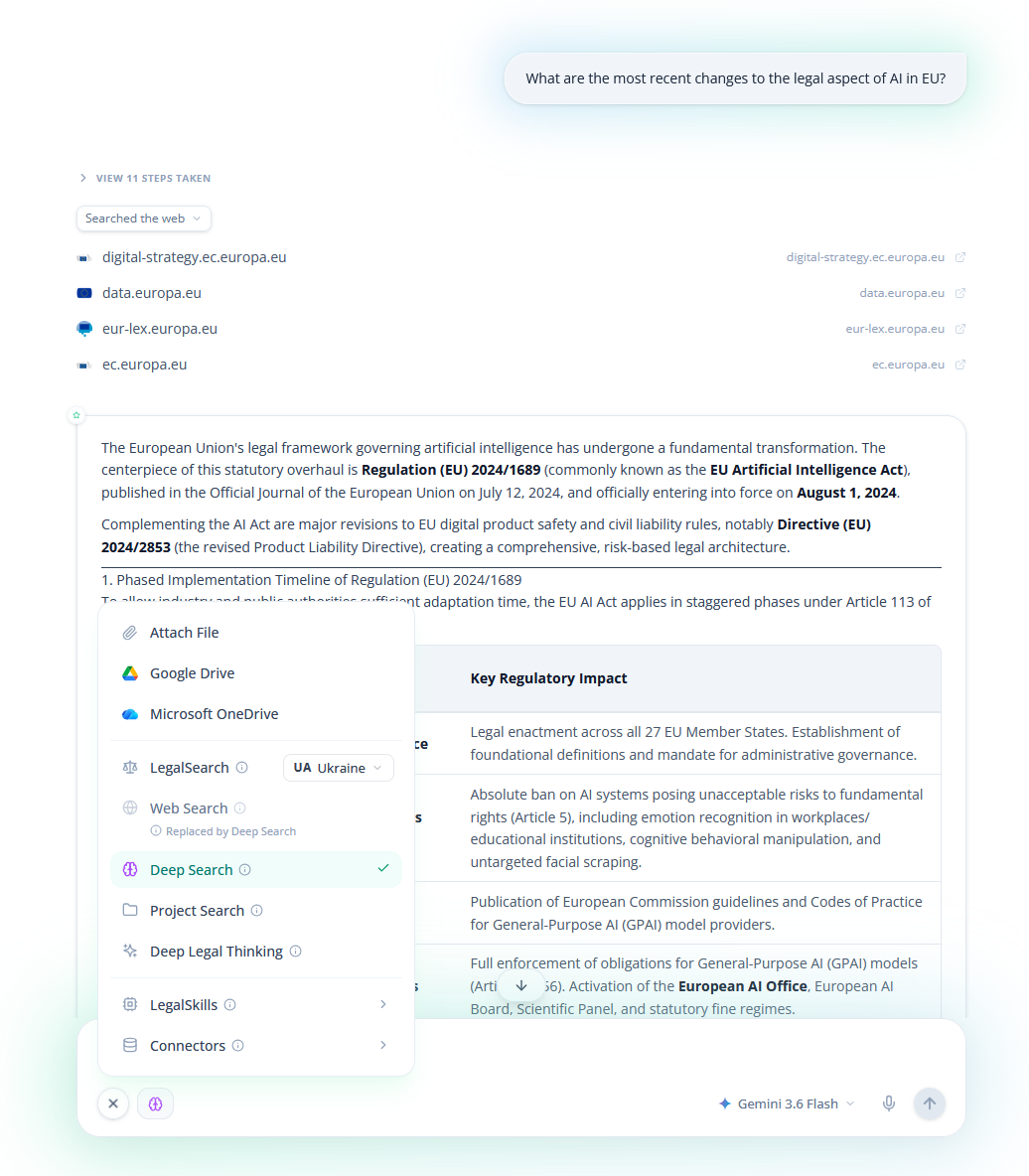
Deep Search is seamlessly integrated into both Global Chat and Project-Specific Chat:
- Open your chat interface in the Legalpunkt workspace.
- Locate the input bar at the bottom of the window.
- Click the Plus (+) icon to open the Sources & Capabilities menu.
- Verify that Deep Search is selected (enabled by default for Pro+ subscribers).
- Type your legal or regulatory inquiry into the prompt bar and press Send.
NOTE
Deep Search performs deep multi-page ingestion across live, official government repositories. While queries complete quickly, complex multi-portal searches may take slightly longer than standard open web searches to ensure exhaustive, multi-subpage verification.
TIP
Combining Deep Search with Project Search: To verify your client's drafted commercial agreement against live regulatory directives, enable both Deep Search and Project Search. The agent will read your uploaded contract files and cross-examine them directly against official statutory requirements.