
Playbook Compliance & AI-Driven Contract Review
Negotiating commercial agreements requires balancing business speed with corporate governance. LegalContracts enforces this balance through its automated compliance engine.
Instead of performing broad keyword scans, the Legalpunkt agent performs a line-by-line semantic audit of your agreements, matching individual clauses against your active playbook policies and cross-referencing industry standards via LegalSearch.
Why a Line-by-Line Semantic Audit Matters
Legacy tools scan for specific keywords (like "indemnity" or "liability"). However, sophisticated counterparty agreements often hide non-compliant provisions under generic or unrelated headings, or rephrase standard terms to bypass keyword filters.
LegalContracts reads between the lines by using a deep semantic parser that:
- Analyzes Sentence Intent: Assesses the legal obligation of every line in the contract.
- Identifies Compliance Gaps: Automatically flags missing protections or deviations from your guidelines, regardless of the exact terminology used by the counterparty.
- Resolves Ambiguity: Uses historical data and connected playbooks to determine if a specific phrasing poses a risk to your organization.
Selecting the Right Playbook
Not all transactions carry the same risk profile. A clause that is acceptable in a standard NDA might be completely unacceptable in a high-value Master Services Agreement (MSA).
LegalContracts allows you to pair any document with the appropriate playbook from your library:
- Open the Contract: Select your draft agreement in the workspace.
- Access the Playbook Library: Use the control panel to view available guidelines.
- Apply Your Target Policy: Choose a standard NDA policy, vendor MSA guide, DPA compliance ruleset, or a specialized commercial lease playbook. The AI instantly updates its validation rules to fit that specific negotiation context.
The Dual-Layer Review System
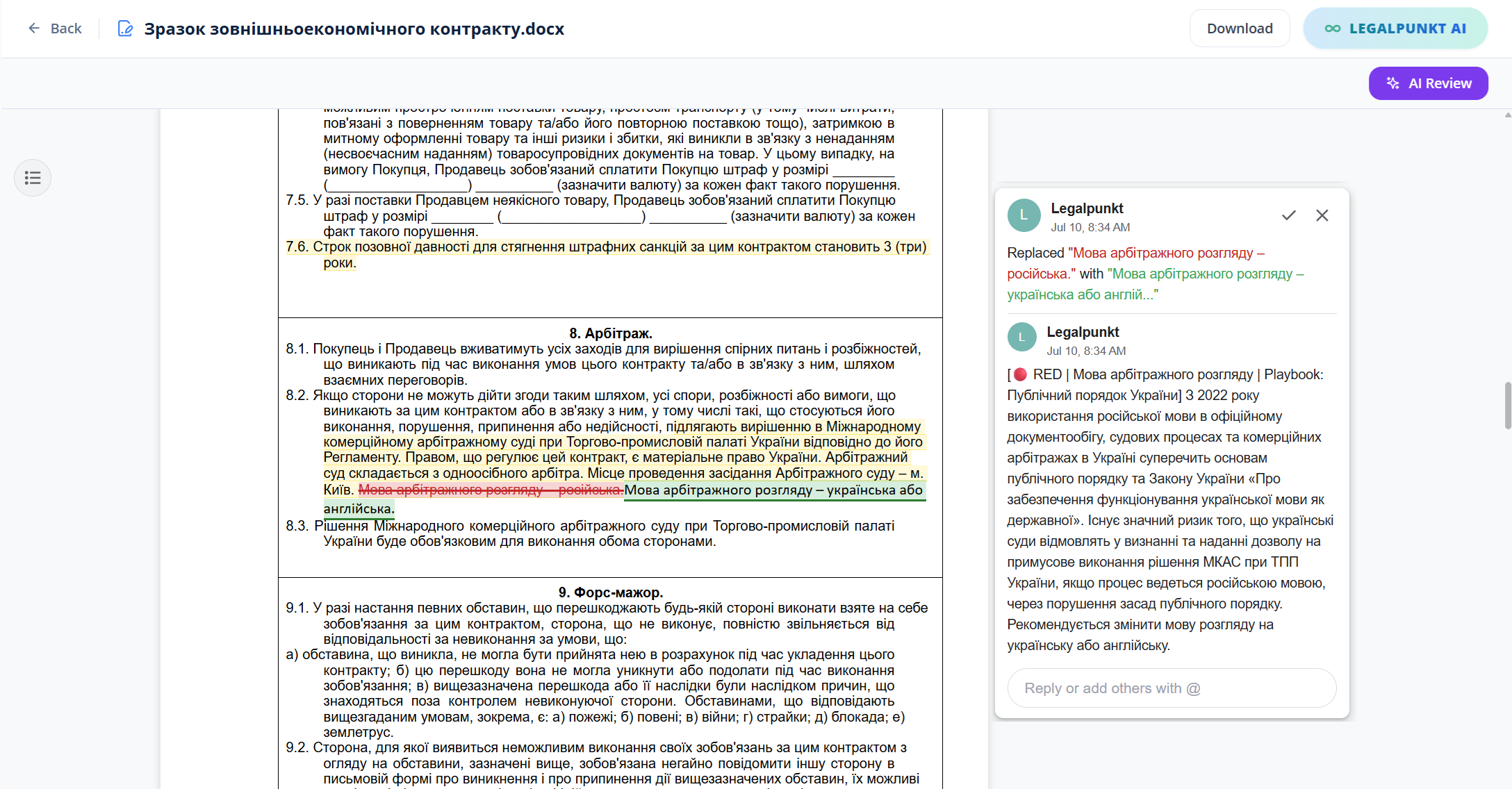
Once a playbook is selected and the line-by-line audit completes, deviations and risks are presented through a unified, dual-layer interface designed for rapid analysis and resolution.
1. Inline Color-Coded Highlighting
The document editor applies color-coded highlights directly to problematic clauses within the document body:
- 🔴 Red Highlights (Critical Risks): Flag severe deviations from your playbook. These represent terms that expose your organization to high liability, unfavorable governing laws, or aggressive third-party indemnifications.
- 🟡 Yellow Highlights (Moderate Risks): Indicate minor deviations or missing standard protections, such as liability caps set below pre-approved thresholds or vague warranty timelines.
2. The Bottom Summary & Fallback Bar
A dedicated analytical bar is docked at the bottom of the editor window. This interactive panel acts as your drafting co-counsel:
- Deviation Navigation: Lists the total number of flagged risks. Clicking a count focuses the editor directly on the corresponding line in the document.
- Risk Explanations: Provides a clear, business-oriented explanation of why the line was flagged.
- Playbook Rules Reference: Displays the specific playbook guideline that was violated.
- Pre-Approved Fallbacks: Suggests alternative, pre-approved drafting language that matches your playbook guidelines. You can copy and paste this fallback text directly into the document editor.