
LegalPunkt Settings: What are LegalSkills?
This guide provides a detailed walkthrough of the LegalSkills, where you configure the specialized legal capabilities of your AI Agent. By activating or deactivating skills, you control the exact domain expertise, jurisdictional frameworks, and automated workflows that your agent applies during every conversation, review, and analysis.
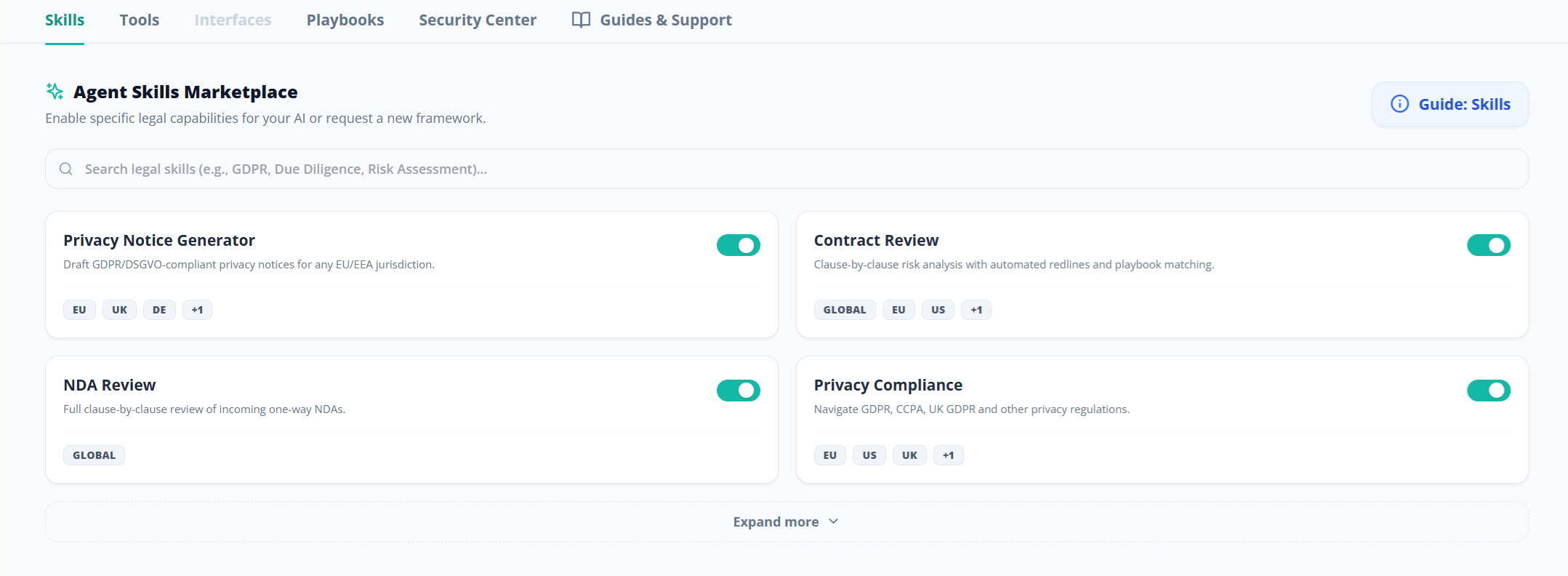
What Are LegalSkills?
LegalSkills are modular, dynamic, and domain-specific capability packs that extend your AI Agent's core reasoning engine. By default, your agent possesses general legal reasoning abilities, but it operates without deep specialization. When you activate a skill, you inject a structured layer of expertise — including jurisdiction-specific statutes, compliance frameworks, specialized prompt structures, and automated extraction workflows — directly into the agent's analytical pipeline.
Think of skills as hiring a specialist consultant. Rather than asking a general practitioner to review a GDPR compliance matter, you bring in a data privacy expert who already knows the relevant regulations, enforcement precedents, and documentation requirements. LegalSkills work in exactly the same way: each one pre-loads the agent with the contextual knowledge and structured methodology it needs to perform a specific legal task at a professional level.
LegalSkills apply globally across all of your projects. When you activate a skill in Settings, it is available to the agent in every project workspace, every chat session, and every contract review. You do not need to configure skills on a per-project basis.
Available LegalSkills Breakdown
The following specialized LegalSkills are available in the LegalPunkt marketplace. Click on any of the guides below to read about their specific capabilities, covered jurisdictions, automated workflows, and best practices:
- Privacy Notice Generator: Draft comprehensive, GDPR/DSGVO-compliant privacy notices formatted in Markdown for any EU/EEA jurisdiction and audience.
- Commercial Contract Review: Review commercial agreements against standard industry negotiation positions, flag deviations, classify risk severity, and generate redline proposals.
- NDA Review: Execute a targeted, jurisdiction-agnostic review of incoming unilateral (one-way) commercial Non-Disclosure Agreements.
- Privacy Compliance Navigator: Navigate complex global privacy frameworks, review Data Processing Agreements (DPAs), address regulatory shifts, and handle data subject rights request processes.
- Legal Risk Assessment Matrix: Evaluate and categorize organizational, contract, or litigation risks using a structured severity-by-likelihood matrix and formal escalation guidelines.
- Transcript & Quote Analysis: Perform meticulous phrasal and linguistic analysis of transcripts, interrogation records, and audio/video control protocols to identify legal defenses.
- Legal Invoice Auditor: Audit external, third-party legal invoices against strict corporate billing guidelines and draft formal Requests for Billing Corrections.
- Legal Timesheet & Invoice Generator: Generate polished, professional, database-ready invoices and timesheets for your own billable hours and case activity.
💡 Coming Soon: Create Your Own Custom LegalSkills!
We are actively planning an advanced Custom Skills Creator. While this feature is currently in the conceptual and design pipeline (and not yet implemented in your dashboard), our vision is to allow you to build custom skills from scratch.
Soon, you will be able to upload your proprietary organizational playbooks, prompt templates, and industry-specific regulations to train your custom skills—giving your AI Agent bespoke capabilities unique to your internal legal team’s workflow. Stay tuned!
How to Activate or Deactivate a LegalSkill
The approach here is intuitve, and is simple to turn Skills on and off:
- Navigate to Settings by clicking the button at the bottom of the left sidebar.
- You will land on the Skills tab by default.
- Locate the skill you want to manage.
- Click the toggle switch on the right side of the skill card.
- If the toggle turns teal/green, the skill is now active. The agent will immediately begin using this skill's framework in all future interactions.
- If the toggle turns grey, the skill is now disabled. The agent will stop applying this skill's specialized reasoning.
Best Practices for Skill Management
- Activate only what you need. While it might be tempting to enable every available skill, doing so can broaden the agent's analytical scope unnecessarily. For focused contract reviews, enable only "Contract Review" and the relevant jurisdiction skill. This keeps the agent's analysis targeted and reduces noise.
- Match skills to your active matters. If you are currently working on privacy notices, enable "Privacy Notice Generator". If you pivot to auditing a law firm's invoice, swap over to the "Legal Invoice Auditor" skill. Adjusting skills to match your current workload produces the most relevant results.
- Combine skills for complex workflows. Skills can work together. For example, activating both "Commercial Contract Review" and "Privacy Compliance Navigator" simultaneously allows the agent to perform a dual-lens analysis — checking contracts against your standard commercial playbook rules while also scanning for strict data privacy compliance gaps.
- Check jurisdiction tags before activating. Each skill lists the jurisdictions it covers. Make sure the skill applies to the legal system governing your matter before activating it to avoid receiving analyses based on irrelevant legal frameworks.