
Transformation Agent: Agent Workflow & Artifacts
The Transformation Agent is the core engineering power of the Datapunkt ecosystem. It acts as an autonomous developer that converts logical designs, schemas, mapping rules, and non-technical business descriptions into high-performance, target-optimized, and production-ready data pipelines. By automating the mechanical setup and performance engineering of analytical transformations, this agent compresses months of pipeline coding and debugging cycles into a verified output delivered in under five minutes, saving up to 95% of engineering time.
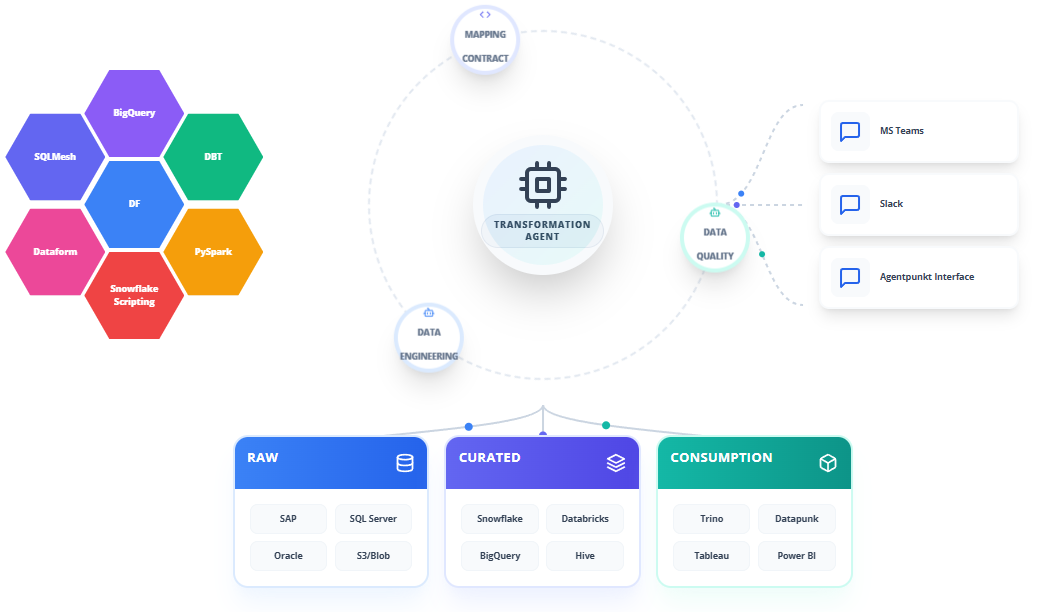
The agent natively supports a diverse array of modern platforms, execution engines, and orchestration frameworks:
- SQLMesh
- Dataform
- BigQuery
- DF (DataFrame / Spark DataFrame / Polars DataFrame APIs)
- Snowflake Scripting
- dbt
- PySpark
Core Transformation Generation Features
To deliver end-to-end pipeline automation, the Transformation Agent implements several advanced capabilities across the development lifecycle:
- AUTOMATED PIPELINE SCAFFOLDING: Instantly generates boilerplate structures, imports, configuration blocks, headers, and metadata tags required by the chosen execution engine.
- PERFORMANCE-OPTIMIZED REFINEMENT: Inspects code to recommend and implement target-specific speedups, including clustering, partitioning keys, and optimized join structures.
- LOGIC SYNTHESIS FROM INPUTS: Translates custom mappings, spreadsheet tables, or written rules into syntactically perfect SQL statements or Python code.
- SELF-DOCUMENTING LIFECYCLE: Auto-generates clear inline documentation, schema definitions, YAML descriptors, and column-level descriptions alongside the pipeline code.
- MULTI-PLATFORM COMPATIBILITY: Translates code packages and schemas between platforms, such as converting a PySpark pipeline into an optimized Snowflake Scripting block.
Step-by-Step Operational Workflow
The Transformation Agent uses an interactive, dual-pane workspace that bridges business logic requirements with automated code synthesis.
Step 1: Subscribing to the Agent
Acquire subscription access to the Transformation Agent through the platform:
- Log in to the Agentpunkt platform.
- Search for the Transformation Agent in the available service catalog.
- Select your preferred subscription term (7 days, 14 days, or Monthly).
- Navigate to your Hired Agents Page to manage active subscriptions.
Step 2: Workspace Session Initialization
Launch the agent to initialize your interactive workspace:
- Click "Start Session" to open the interactive dual-pane user interface.
- The Left Pane is your Interactive Chat & Session History, where you communicate with the agent, upload input requirements, and refine code.
- The Right Pane is the Visual Workspace & Generated Code editor, where you review, edit, and download completed pipelines, SQL configurations, and schema files.
Step 3: Organizing and Uploading Mapping Inputs
Compile and upload the source logic to provide context:
- In the Left Pane, upload your source table schemas (YAML, JSON, or DDL).
- Upload destination table specifications or logical models created by the Data Modeling Agent.
- Upload mapping spreadsheets or textual business requirements defining column-level derivations.
Step 4: Logic Formulation and Prompting
Instruct the agent on your target technology and logic using plain language.
- Example prompt: "I need to build an incremental SQLMesh model that reads from raw_transactions, joins it with customer_profiles on customer_id, calculates running spend totals, and writes the results to BigQuery with partitioning on transaction_date."
Step 5: Iterative Refining & Performance Auto-tuning
Interact with the agent to polish the synthesized output:
- The agent writes the completed files in the Right Pane.
- If logic must be updated, provide additional instructions in the Left Pane (e.g., "Change the calculation to use local timezone conversions and filter out test customer accounts").
- The agent regenerates only the affected code blocks in real time.
Step 6: Code Export and CI/CD Deployment
Deploy your code assets directly to production:
- Copy code segments directly from the Right Pane or export files as a zip file.
- Integrate these files into your git-based repository.
- Run your standard CI/CD deployment pipelines to deploy to your development or production environment.
Benefits: What Makes It Good?
- Accelerated Time-to-Market: Delivers production-ready pipeline modules in minutes, reducing the standard data engineering development cycle by up to 95%.
- Dialect Precision & Flexibility: Seamlessly targets multiple dialects (SQLMesh, Dataform, BigQuery, Snowflake Scripting, dbt, PySpark), producing optimized layouts matching best practices.
- Auto-Tuned Code Quality: Applies built-in performance rules (such as partition pruning, clustering, and broadcast optimization) without requiring manual tuning.
- Reduced Human Overhead: Minimizes manual code preparation, allowing engineers to focus on architectural layouts and data governance policies.