
Mapping Contract Agent: Workflow & Artifacts
The Mapping Contract Agent is the central coordinator for translating data between your source architectures and model schemas. It defines and governs how columns, types, and logic map from incoming source schemas to target definitions, establishing a robust contract. The agent natively supports automated documentation, custom business logic, both SQL and Python code generation, source-to-target tracking, data quality (DQ) validation rules, human-in-the-loop approval workflows, and version control.
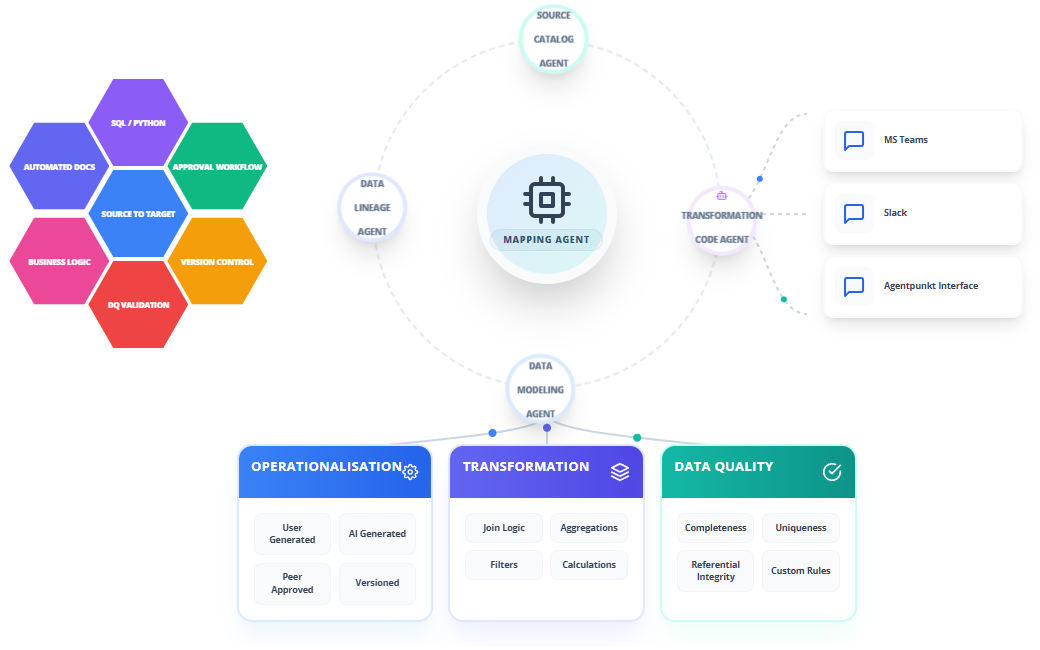
Supported Mapping Features
To enable end-to-end data pipeline orchestration and governance, the Mapping Contract Agent provides full coverage of the integration lifecycle:
- AUTOMATED DOCS: Instantly generates rich schema explanations, definitions, mapping justifications, and documentation for developer or auditing use.
- BUSINESS LOGIC: Synthesizes complex transformations, lookup functions, calculations, and conditional logic.
- SQL/PYTHON: Generates native pipelines and transformation scripts in your choice of standard SQL (for databases and warehouses) or Python (for Pandas, Spark, or serverless execution).
- SOURCE TO TARGET: Establishes complete, column-level traceability from source schemas to target schemas, ensuring auditability.
- DQ VALIDATION: Embeds automated data quality constraints directly into the generated contract (null limits, range checks, format matching).
- APPROVAL WORKFLOW: Implements a human-in-the-loop approval gateway where changes must be reviewed and digitally signed off before production deployment.
- VERSION CONTROL: Manages mapping revisions with semantic versioning and git-compatible contract tracking to record all history and modifications.
Step-by-Step Operational Workflow
The Mapping Contract Agent operates within an interactive dual-pane workspace, enabling data architects and engineers to quickly design, validate, and version mapping contracts.
Step 1: Subscribing to the Agent
Get access to the Mapping Contract Agent via the platform catalog:
- Navigate to the Agentpunkt platform and sign in.
- Search for the Mapping Contract Agent in the available catalog.
- Select your subscription duration (7 days, 14 days, or Monthly).
- Go to your Hired Agents Page to manage active subscriptions.
Step 2: Workspace Session Initialization
Launch the agent to initialize your interactive workspace:
- Click "Start Session" to open the interactive dual-pane interface.
- The Left Pane is your Interactive Chat & Session History, where you communicate with the agent, upload schemas, and prompt for revisions.
- The Right Pane is the Visual Workspace & Generated Code, where you inspect the active mapping contracts, transformations, and diagrams.
Step 3: Providing Source and Target Metadata
Initialize the mapping by loading the schemas you want to connect:
- In the Left Pane, upload the source schema (generated by the Data Source Agent) and the target schema (generated by the Data Modeling Agent).
- You can also upload custom business requirement files, mapping sheets, or legacy transform scripts.
- Provide instructions in plain language. For example: "Please map our MySQL source tables to the Snowflake analytics model, ensuring PII columns are masked and standard business logic is applied."
Step 4: Reviewing the Synthesized Source-to-Target Map
Review the agent's semantic recommendations in the Right Pane:
- The agent parses names, descriptions, and data distributions to create a draft Source to Target mapping.
- It automatically adds Automated Docs for each mapping choice, explaining why it mapped a source column to a target column.
- Inspect the draft for any mismatched data types or names.
Step 5: Applying Custom Business Logic and SQL/Python Transforms
Tailor the transformation details using conversational commands:
- Prompt the agent in the Left Pane to write custom Business Logic. For example: "For the total price, multiply unit cost by quantity and apply a tax multiplier of 1.15."
- Specify your preferred language: SQL (for DBT/Snowflake views) or Python (for Spark/Pandas execution).
- The agent instantly regenerates the corresponding transformation code block in the Right Pane.
Step 6: Setting Up DQ Validation Gates
Configure the automated data quality rules embedded in the contract:
- Tell the agent what constraints are critical. For example: "Verify that customer email is never null and transaction amount is always greater than zero."
- The agent appends these rules to the mapping contract, ensuring that your orchestration engine will execute DQ Validation before loading the target database.
Step 7: Executing the Approval Workflow
Ensure compliance through formal sign-off:
- Click the "Approve Contract" button or type "Approve current mapping" in the chat interface.
- The system registers your username, timestamps the decision, and freezes the contract state.
- This creates a secure audit trail of who authorized the data flow.
Step 8: Version Control and Git Export
Finalize the session by exporting the versioned assets:
- The agent assigns a semantic version (e.g., v1.1.0) and records the change history.
- Export the final mapping contract as a YAML or JSON document.
- Commit this file directly to your Git repository to track your pipeline configurations in Version Control.
Core Output Artifacts
The Mapping Contract Agent outputs structured files that serve as the direct configuration for your integration pipelines.
1. Mapping Contract Definition (YAML)
This artifact holds the source-to-target rules, data quality validation constraints, and approval metadata:
contract_metadata:
  contract_id: "mc_billing_v1"
  version: "1.1.0"
  status: "APPROVED"
  approved_by: "alex.developer@enterprise.com"
  approved_timestamp: "2026-06-24T17:19:20Z"

source_to_target_mappings:
  - source_field: "src_db.billing.cust_num"
    target_field: "target_warehouse.finance.customer_id"
    description: "Unique account identifier mapped from transactional source system."
    data_quality_rules:
      - rule_type: "NOT_NULL"
      - rule_type: "REGEX_MATCH"
        expression: "^CUST-[0-9]{5}$"

  - source_field: "src_db.billing.unit_val"
    target_field: "target_warehouse.finance.total_amount"
    business_logic: "Multiply unit_val by quantity and apply a tax rate of 1.15."
    transformation_type: "BUSINESS_LOGIC"
    data_quality_rules:
      - rule_type: "MIN_VALUE"
        limit: 0.01
2. Transformation Pipeline (SQL / Python)
Based on your choice, the agent produces deployment-ready code.
Generated SQL View (DBT Compatible)
-- Generated by Mapping Contract Agent
-- Version: 1.1.0
-- Target Dialect: Snowflake

WITH source_data AS (
    SELECT
        cust_num,
        unit_val,
        quantity,
        load_timestamp
    FROM {{ source('billing_system', 'billing') }}
)

SELECT
    cust_num AS customer_id,
    -- Business Logic transformation
    CAST(unit_val * quantity * 1.15 AS NUMBER(12,2)) AS total_amount,
    CAST(load_timestamp AS TIMESTAMP_NTZ) AS record_timestamp
FROM source_data
Generated Python Script (Spark DataFrame Compatible)
# Generated by Mapping Contract Agent
# Version: 1.1.0
# Engine: PySpark

from pyspark.sql import functions as F
from pyspark.sql.types import DecimalType, TimestampType

def transform_billing(source_df):
    return source_df.select(
        F.col("cust_num").alias("customer_id"),
        # Business Logic transformation
        (F.col("unit_val") * F.col("quantity") * 1.15)
        .cast(DecimalType(12, 2))
        .alias("total_amount"),
        F.col("load_timestamp").cast(TimestampType()).alias("record_timestamp")
    )
Benefits: What Makes It Good?
- No Manual Spreadsheet Chaos: Eliminates the risk of broken pipelines caused by out-of-date Excel mapping files. Everything is declared in a machine-readable, version-controlled contract.
- Instant SQL and Python Portability: Allows you to switch execution layers easily from SQL databases to Python-based Spark data lakes without rewriting your business logic.
- Built-in Quality Protection: Ensures that bad data is trapped before it enters your analytics or reporting databases by writing DQ Validation rules directly into the contract definition.
- Complete Audit Trail: Every modification is version-controlled and approved with user details, satisfying strict regulatory audits for data lineage and corporate compliance.