
Data Product Agent: Agent Workflow & Artifacts
The Data Product Agent serves as the primary coordinator for managing, documenting, and publishing high-quality data products within the Datapunkt ecosystem. In modern decentralized organizations, a data product is not merely a raw database table or a file stream; it is a complete, self-contained, and governed asset that delivers measurable business value. The agent automates the creation of these assets by translating raw database definitions and business requirements into structured Data Product specifications, while enforcing strict testing rules and syncing with enterprise catalogs.
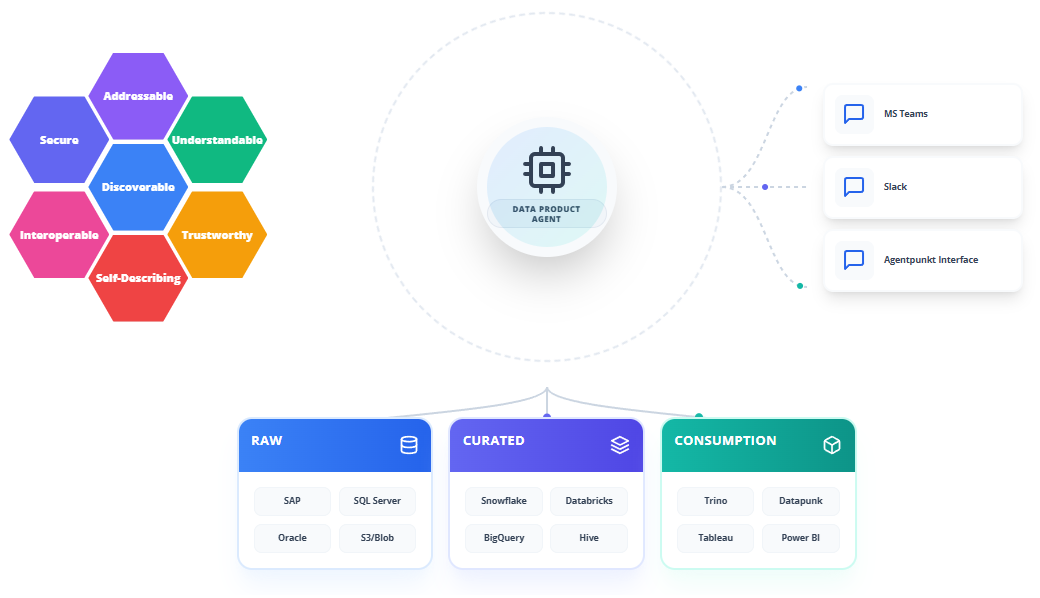
Support for Core Data Product Principles
To ensure your data assets operate as true products, the Data Product Agent designs and validates every artifact against the seven fundamental principles of the Data Mesh paradigm:
- Secure: The agent embeds access control schemas, column-level masking rules, and row-level security (RLS) definitions directly into the product descriptor, ensuring least-privilege access.
- Interoperable: It generates platform-agnostic schema contracts and standardized serialization formats (e.g., Apache Iceberg, Delta Lake, JSON Schema) to facilitate seamless queries across different departments and technologies.
- Addressable: The agent defines unique, immutable Uniform Resource Identifiers (URIs) and API endpoints, making it simple for analytical engines to locate and connect to the product.
- Discoverable: It automatically produces catalog descriptors containing searchable business tags, descriptions, ownership info, and classification levels to register the product in enterprise marketplaces.
- Understandable: The agent generates detailed Technical Design Documents (TDD) that explain the business context, column semantic definitions, and data profiling characteristics.
- Self-Describing: Every data product includes embedded metadata specifying its schema version, generation frequency, record layout, and format details, allowing consumers to interact with it programmatically without human intervention.
- Trustworthy: The agent establishes automated test parameters, SLA/SLO thresholds, and data quality check configurations (e.g., null counts, schema drift tests) that must be validated continuously.
Step-by-Step Operational Workflow
The Data Product Agent features an interactive, prompt-driven design interface with robust version-control capabilities. Follow this step-by-step walkthrough to subscribe to, configure, and publish a data product.
Step 1: Subscribing to the Agent
Before you can create data products, obtain a subscription from the platform marketplace:
- Log into your account on the Agentpunkt platform.
- Locate the Data Product Agent in the agent catalog.
- Select your preferred subscription term (7 days, 14 days, or Monthly).
- Navigate to your Hired Agents Page to manage active subscriptions and spin up interactive workspace sessions.
Step 2: Initializing the Design Workspace
When you start a session with the Data Product Agent, it sets up a developer workspace designed for real-time collaboration:
- Click the "Start Session" button on your Hired Agents panel to open the environment.
- Use the Left Pane (Interactive Conversation & Inputs) to provide instructions, copy schemas, or upload data dictionaries.
- Review the Right Pane (Visual Blueprint & Code Workspace) to inspect generated specifications, architecture layouts, and documentation drafts.
Step 3: Defining Business Value and Source Schema Context
Provide the agent with the necessary context regarding what you are building and why:
- In the Left Pane, upload the source database schemas (e.g., DDL, JSON Schema, or CSV samples) that will feed your data product.
- Describe your target business use case in plain language. For example: "We need to build a customer churn analysis dataset that combines raw subscription records with daily website activity logs. It must serve our marketing team's CRM dashboards daily."
- Define the core metadata parameters:
- Domain Owner: The business unit or team responsible for the product (e.g., "Customer Success").
- Target SLA: The frequency and delivery timeline (e.g., "Daily by 06:00 UTC, freshness <= 24 hours").
- Target Consumers: The users or downstream applications consuming the data.
Step 4: Iterative Refinement and Review
Optimize the data product's structure and behavior through active design iteration:
- Review the generated YAML descriptor and architectural documentation in the Right Pane.
- Provide feedback in the chat window to adjust the design. For example: "Enforce strict GDPR tagging on the email address column and add an SLO requiring that the completeness rate of the customer identifier remains at 100%."
- The agent will immediately update the files in the Right Pane, highlighting changed configuration blocks for your validation.
Step 5: Exporting the Data Product Package
Once you approve the design, export the generated assets for deployment:
- Click the "Export Package" button in the Workspace UI.
- Download the deployment bundle, which includes the YAML product descriptor, the TDD markdown documentation, and the testing suite configurations.
- Commit these artifacts to your company's git repository to initiate automated infrastructure provisioning and catalog synchronization.
Benefits: What Makes It Good?
- No Manual Documentation Overhead: Product owners do not have to write manual, out-of-date architecture wikis. The agent keeps technical specifications and business requirements unified automatically.
- TDD for Data: Enforces test-driven engineering before products are released, preventing broken analytics reports and schema violations down the pipeline.
- Instant Marketplace Compatibility: Because the outputs conform to standard descriptors, registering the product in internal marketplaces requires seconds instead of custom engineering.
- Built-in Security and Compliance: Access policies and PII handling rules are defined alongside the data schema, guaranteeing that data privacy is structurally enforced.