
Data Lineage Agent: Workflow & Artifacts
The Data Lineage Agent is the automated mapping core of the Datapunkt ecosystem. It acts as an active observer that observes, reconstructs, and visualizes how data flows across files, tables, transformations, and agents. By automatically parsing schema metadata and transformation scripts, the agent builds a real-time, column-level diagram of your data estate, ensuring total transparency and auditability.
The agent natively supports several industry-standard metadata and lineage formats, enabling automated discovery, lineage visualization, data flow analysis, impact auditing, and version tracking.
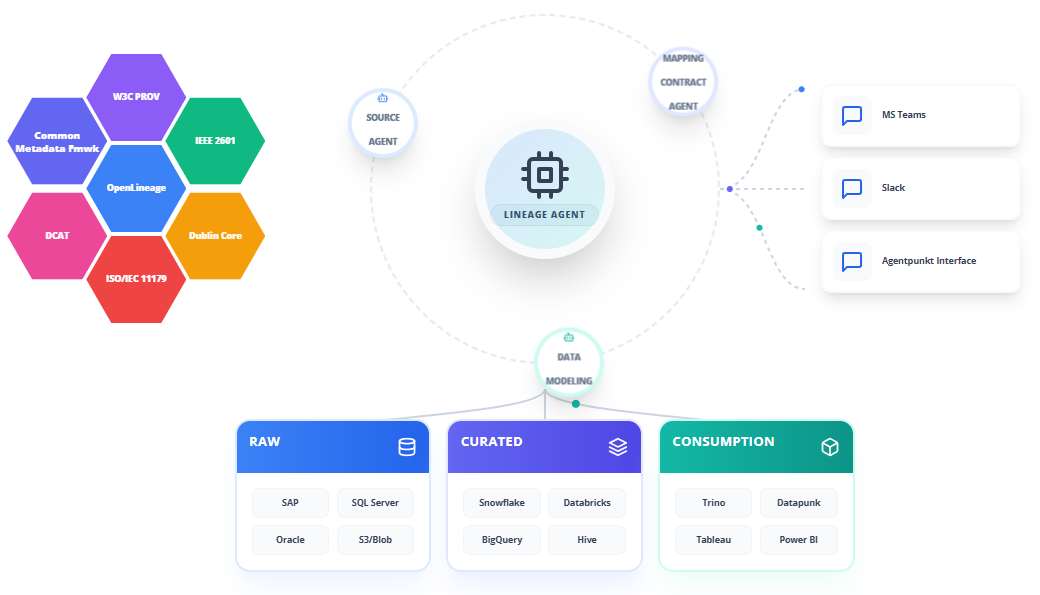
Core Lineage Tracking Features
To provide end-to-end lineage mapping and data governance, the Data Lineage Agent implements powerful capabilities across the data integration lifecycle:
- AUTOMATED LINEAGE HARVESTING: Automatically reads transformation metadata, system logs, and mapping configurations to extract data flow paths without requiring manual cataloging.
- COLUMN-LEVEL TRACEABILITY: Maps specific columns from source tables to target views, demonstrating exactly how individual fields are populated.
- TRANSFORMATION LOGIC ENCODING: Decodes calculations, aggregations, and filters to display how values are transformed at each step.
- OPEN STANDARDS EXPORT: Generates structured files compliant with OpenLineage, W3C PROV, and other major lineage frameworks for immediate ingestion by enterprise metadata catalogs.
- DOWNSTREAM IMPACT IDENTIFICATION: Maps relationships to identify all downstream systems, modeling configurations, and dashboards that depend on a particular data source.
- HISTORICAL REVISIONS: Tracks modifications in pipelines over time, maintaining historical versions of the lineage graph to support debugging and compliance audits.
Step-by-Step Operational Workflow
The Data Lineage Agent features an interactive, dual-pane workspace that allows data architects, stewards, and engineers to analyze pipelines and export lineage models.
Step 1: Subscribing to the Agent
Obtain access to the Data Lineage Agent through the platform marketplace:
- Log in to the Agentpunkt platform.
- Search for the Data Lineage Agent in the available service catalog.
- Select your preferred subscription term (7 days, 14 days, or Monthly).
- Navigate to your Hired Agents Page to manage active subscriptions.
Step 2: Workspace Session Initialization
Launch the agent to initialize your interactive workspace:
- Click "Start Session" to open the interactive dual-pane user interface.
- The Left Pane is your Interactive Chat & Session History, where you run queries, upload operational scripts, and command the agent.
- The Right Pane is the Visual Workspace & Generated Diagrams, where you inspect interactive lineage graphs, column paths, and exported metadata structures.
Step 3: Connecting Sources & Harvesting Metadata
Introduce the agent to your data landscape by providing access to your schema metadata:
- In the Left Pane, upload the schemas or contract definitions generated by the Source Catalog, Data Modeling, or Mapping Contract Agents.
- You can also upload SQL scripts, dbt project files, or pipeline execution logs.
- Provide instructions in plain language. For example: "Scan our Snowflake analytics database metadata and ingest the current dbt manifest to map downstream dependencies."
Step 4: Lineage Graph Synthesis & Visualization
Review the agent's synthesized data flows:
- The agent parses the inputs and compiles a dynamic, column-level lineage graph in the Right Pane.
- Click on individual tables or nodes in the diagram to inspect their immediate upstream sources and downstream targets.
- The interface displays semantic details, showing exactly which Mapping Contract or transformation step was applied.
Step 5: Downstream Impact Analysis
Identify what will break before making schema alterations:
- Ask the agent to run an impact report. For example: "If we rename the
phone_numberfield in our raw staging table, which downstream models and reporting views are impacted?" - The Right Pane highlights all affected downstream paths in red, detailing the specific attributes and dashboards that will require updates.
Step 6: Exporting Standardized Lineage Artifacts
Generate exportable, platform-independent metadata packages:
- Request your desired export format (such as OpenLineage JSON, W3C PROV JSON-LD, or Dublin Core metadata records).
- The agent outputs the schema definitions and relationships into the workspace.
- Download the files or configure the agent to write them directly to your central metadata repositories or version control systems.
Benefits: What Makes It Good?
- End-to-End Pipeline Visualization: Translates raw database metadata and transformation scripts into an interactive, visual graph that is easy to navigate.
- Proactive Outage Prevention: Identifies downstream dependencies before schema changes are deployed, preventing broken dashboards and pipeline failures.
- Standardized Metadata Interoperability: Natively supports major frameworks like OpenLineage and W3C PROV, allowing easy integration with enterprise tools like Apache Atlas or Collibra.
- Time-to-Audit Reduction: Automates the collection and synthesis of pipeline trails, transforming compliance reviews from months of manual tracing to an instantaneous export.