
Data Modeling Agent: Workflow & Artifacts
The Data Modeling Agent serves as the authoritative controller for data structures, business semantics, and downstream mapping within the Datapunkt ecosystem. By programmatically digesting requirements and translating them into robust target models (such as Raw Vault, Canonical, and Consumption models), the agent eliminates the bottlenecks of manual database design and maintains a version-controlled, human-approved single source of truth.
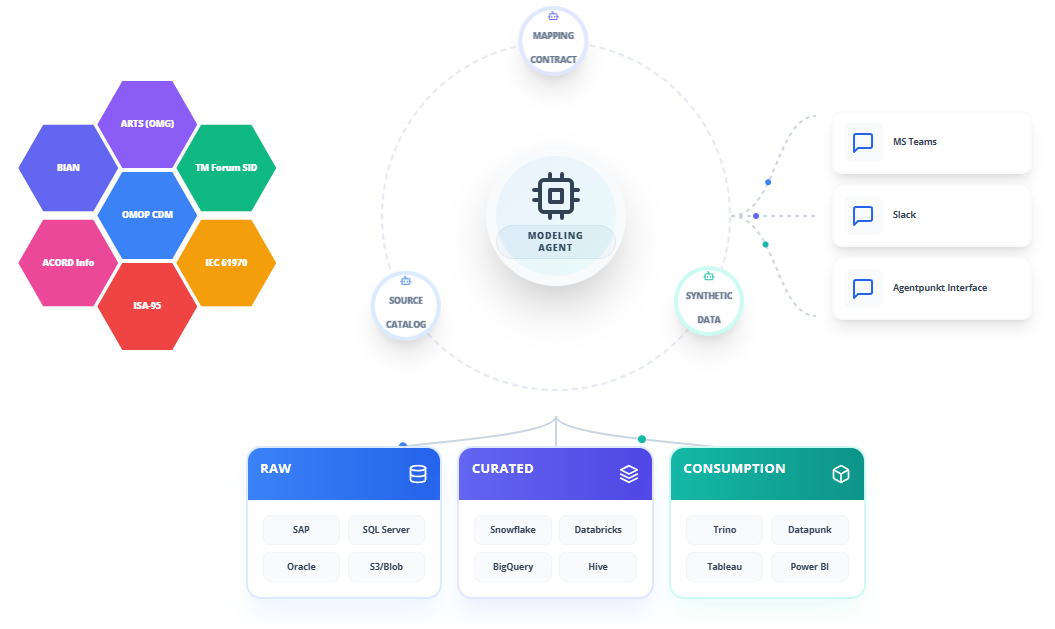
Supported Data Paradigms
To handle the entire data lifecycle, the Data Modeling Agent designs and generates configurations for three main logical layers:
- Raw Vault Models: Architected for complete auditability, the agent extracts unique business keys from source metadata to dynamically define Hubs, Links, and Satellites. This provides complete trace-to-source tracking for regulatory compliance.
- Canonical Models: Standardized, clean, and integrated intermediary structures. The agent maps complex transactional definitions to industry-standard vocabularies to enforce semantic consistency.
- Consumption Models: Access-ready, high-performance schemas designed for business intelligence (BI) tools, reports, and analytical systems, complete with automatic downstream propagation of schema updates.
Step-by-Step Operational Workflow
The Data Modeling Agent features a prompt-driven design interface with strict human-in-the-loop safeguards. Below is the detailed workflow for subscribing, running, and deploying models with the agent.
Step 1: Subscribing to the Agent
Begin by procuring access to the Data Modeling Agent from the platform marketplace:
- Navigate to the Agentpunkt platform and log into your account.
- Search for the Data Modeling Agent in the catalog.
- Select your desired subscription tier (7 days, 14 days, or Monthly).
- Go to your Hired Agents Page to monitor active subscriptions and start live modeling sessions.
Step 2: Initializing the Workspace Session
When you launch the agent, it sets up an interactive dual-pane workspace designed for real-time iteration:
- Click "Start Session" to open the interactive developer interface.
- Use the Left Pane (Interactive Chat & Session History) to input instructions, ask questions, or drag and drop reference documents.
- Monitor the Right Pane (Visual Workspace & Generated Code) to view emerging structures, schemas, and diagrams.
Step 3: Providing Context and Inbound Sources
Provide the agent with your target goals and physical system contexts:
- In the Left Pane, upload any data dictionaries (CSV, PDF), database schema files (JSON Schema, YAML, XML), or legacy DDL scripts.
- State your objectives using plain language. For example: "We need to ingest these legacy relational tables and build a dbt-compatible Raw Vault structure optimized for Snowflake."
- Define any naming standards (such as prefixes like
stg_orv_) to ensure consistency.
Step 4: Iterative Schema Review and Refinement
Refine the output through conversational adjustments:
- Inspect the generated schemas, ERD layouts, or SQL code displayed in the Right Pane.
- Type edits or updates in the chat window. For example: "Enforce SHA-256 hashing on our customer keys and rename transaction timestamps to comply with ISO-8601."
- The agent will dynamically update the designs in the Right Pane, highlighting the altered lines.
Step 5: Exporting and Deployment
Once finalized, export the structures for deployment:
- Select your target dialect (such as Snowflake, Google BigQuery, Amazon Redshift, Databricks Delta Lake, or standard ANSI SQL).
- Copy the generated DDL scripts or dbt YAML configurations.
- Deploy these files into your staging or production environments using your existing, human-approved CI/CD pipelines.
Benefits: What Makes It Good?
- No Manual Modeling Bottlenecks: Designing Data Vault entities manually takes months. The agent builds Hubs, Links, and Satellites in minutes.
- Human-in-the-Loop Safeguards: No modifications are executed automatically on your live databases. The agent functions as a design advisor, ensuring you have final approval.
- Unified Semantic Propagation: Changes made to upstream models cascade down to downstream consumption views automatically, reducing broken reports.
- Continuous Context Retention: The agent remembers your custom system guidelines and naming preferences during a session, refining its logic over time.