
Data Engineer Support Agent: Agent Workflow & Artifacts
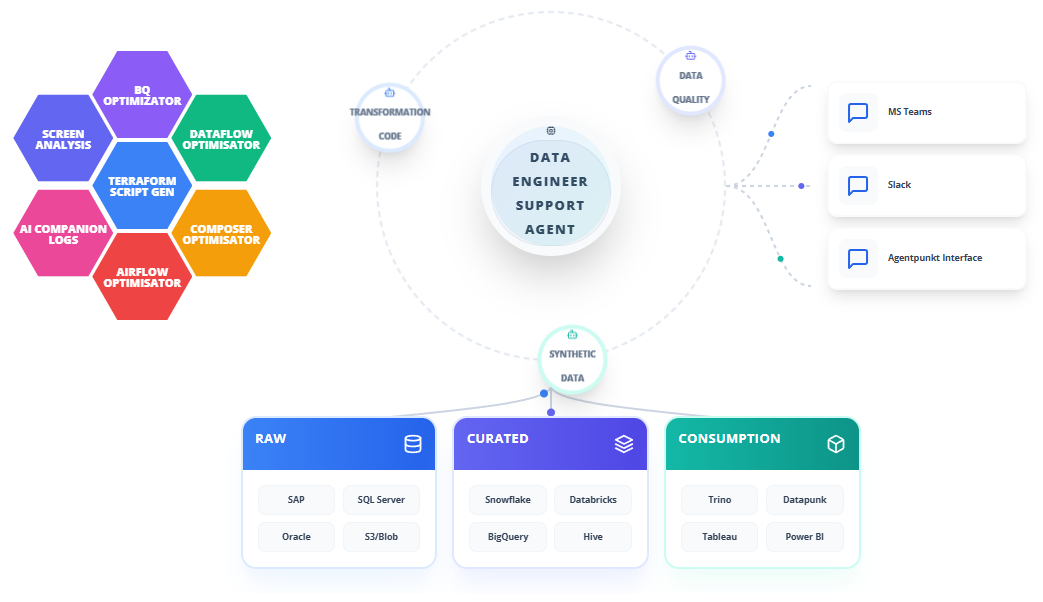
The Data Engineer Support Agent is the autonomous operational co-pilot within the Datapunkt ecosystem, designed to eliminate the most time-consuming, high-skill bottlenecks in modern data engineering. It generates production-ready Infrastructure-as-Code, tunes cloud data stacks for cost and performance, debugs failing pipelines in real time, and enforces privacy-first engineering standards across every artifact it produces.
This guide walks you through the complete step-by-step operational workflow of using the Data Engineer Support Agent, defines every core output artifact, and explains the benefits of integrating it into your daily engineering practice.
Supported Capabilities
The Data Engineer Support Agent natively integrates advanced data security, privacy engineering, and intelligent synthesis techniques across every workflow it executes:
- PII DETECTION: Automatically scans infrastructure configurations, pipeline schemas, query outputs, and log files to identify columns or data streams containing Personally Identifiable Information such as names, email addresses, Social Security numbers, credit card numbers, IP addresses, and geolocation coordinates.
- PRIVACY PRESERVING: Applies noise injection, tokenization, field masking, and pseudonymization logic throughout generated IaC templates and optimization recommendations to ensure that no real-world identity can be reconstructed from any artifact the agent produces.
- GDPR/CCPA: Ensures that every Terraform module, DAG configuration, and query recommendation complies with the General Data Protection Regulation (GDPR) and the California Consumer Privacy Act (CCPA). Generated pipelines include built-in data retention policies, consent-aware routing, and automatic PII quarantine zones.
- ML SYNTHESIS: Leverages machine learning models, including Generative Adversarial Networks (GANs) and Bayesian inference engines, to synthesize realistic test datasets for pipeline validation, load testing, and staging environment provisioning without exposing production records.
- DIFFERENTIAL PRIVACY: Implements mathematically rigorous Epsilon-Delta differential privacy guarantees when generating test data or profiling query outputs, ensuring that no individual record from the source database can be reverse-engineered or isolated from the agent's recommendations.
- SCHEMA FIDELITY: Preserves exact structural constraints, column types, foreign-primary key relationships, nullability requirements, unique constraints, and field length limitations across every generated Terraform resource definition, database migration script, and optimization artifact.
- DATA INTEGRITY: Enforces relational consistency across multi-table pipeline outputs, preventing orphaned rows, key collisions, referential constraint violations, and cascading delete failures in all generated deployment and migration scripts.
- DATA PRIVACY & FIDELITY: Balances absolute privacy security against statistical utility in every recommendation, ensuring that optimized queries and generated test environments behave identically to production systems during analysis, debugging, and model training.
Operational Workflow
The Data Engineer Support Agent utilizes a dual-pane workspace designed to streamline complex engineering operations while maintaining strict security boundaries around your infrastructure metadata.
Step 1: Subscribing to the Agent
To start using the agent, you must obtain a subscription through the platform marketplace:
- Log in to your Agentpunkt platform account.
- Navigate to the platform marketplace catalog and search for the Data Engineer Support Agent.
- Select the subscription plan that fits your team's needs (e.g., Weekly, Bi-weekly, or Monthly).
- Once subscribed, the agent appears on your Hired Agents Page, ready to be activated.
Step 2: Workspace Session Initialization
Open a new workspace session to establish your sandboxed engineering environment:
- Click "Start Session" next to the Data Engineer Support Agent on the Hired Agents Page.
- The user interface splits into two primary panes:
- Left Pane (Interactive Chat & Logs): Here you communicate with the agent in natural language, describe your infrastructure targets, paste error logs, and monitor the agent's step-by-step reasoning and progress updates.
- Right Pane (Workspace & Code Preview): This pane displays generated Terraform modules, optimized SQL queries, rewritten DAG definitions, log analysis reports, and ready-to-deploy configuration files.
Step 3: Infrastructure-as-Code Generation (Terraform)
Deploy production-ready cloud infrastructure without manual console configuration:
- In the Left Pane, describe your target architecture in plain language.
- Example prompt: "I need a Terraform configuration to deploy a Python PySpark job on GCP Dataproc. The job must read from a secured GCS bucket, process the data, and load it into a partitioned BigQuery table. Include IAM service accounts with least-privilege access rules and ensure all PII columns are routed through a quarantine zone."
- The agent processes your request, triggering its PII DETECTION scan against any schema references you provide.
- A complete
.tfmodule appears in the Right Pane, including VPC definitions, IAM policies, subnet routes, security groups, and GDPR/CCPA-compliant data retention configurations. - Review the generated scripts, configure your local environment variables, and run
terraform applyto provision your entire resource stack in under five minutes.
Step 4: DataStack Performance Optimization
Reduce cloud spend and accelerate query execution across your data warehouse and orchestration layer:
- Paste your expensive query execution plan, slow DAG definition, or resource utilization metrics into the Left Pane.
- Example prompt: "Our daily Airflow DAG is taking over two hours to complete because of this specific BigQuery step. Here is the SQL query and the current DAG definition. Please optimize for cost and runtime."
- The agent analyzes the query plan to identify unpartitioned table scans, suboptimal clustering layouts, and redundant data shuffles.
- It rewrites your SQL query to incorporate efficient partitioning keys, clustering columns, and materialized intermediate tables.
- It evaluates the DAG execution graph to detect bottleneck tasks, improper pool allocations, and unbalanced concurrency parameters.
- The optimized SQL and DAG configuration appear side-by-side in the Right Pane. Copy them directly into your repository to see immediate cost and runtime reductions.
Step 5: Real-Time PySpark Log Troubleshooting
Debug failing Spark jobs without manually parsing thousands of log lines:
- Capture the trailing log messages from your terminal, cloud console, or cluster manager when a Spark job fails.
- Paste the log stack trace into the Left Pane, or enable the 24/7 screen-sharing utility to let the agent observe your active IDE session directly.
- Example prompt: "This PySpark job is failing with a generic 'Stage failed' error. Here is the full stack trace from the executor logs. Please find the root cause and give me the exact fix."
- The agent scans JVM thread dumps, executor memory allocations, serialization chains, and data shuffle metrics.
- It isolates the specific root cause (such as an out-of-memory driver error, a mismatched library version, a serialization incompatibility, or a data skew anomaly).
- The agent presents the exact code modifications, Spark submission flags, or cluster configuration changes needed to resolve the issue in the Right Pane.
Step 6: Privacy-Compliant Test Data Generation
Provision realistic staging datasets without exposing production records:
- Provide your target database DDL or a JSON schema representation in the Left Pane.
- The agent triggers PII DETECTION to identify sensitive columns and applies ML SYNTHESIS to generate statistically representative records.
- DIFFERENTIAL PRIVACY noise is injected according to your configured Epsilon budget to prevent re-identification.
- The generated dataset, along with bulk-load SQL scripts that preserve DATA INTEGRITY and SCHEMA FIDELITY, appears in the Right Pane.
- Download the data in CSV, Parquet, or JSON format, or copy the injection scripts to populate your staging warehouse directly.
Step 7: Artifact Review and Export
Once the agent completes any workflow, review and export your deliverables:
- All generated files are displayed in the Right Pane with syntax highlighting and inline documentation.
- Download individual files or export the entire session as a compressed archive.
- Copy specific code blocks directly from the Right Pane into your local repository, CI/CD pipeline, or version control system.
Benefits: What Makes It Good?
- Deployment Acceleration: Shrinks cloud provisioning from days or weeks of manual console work to under five minutes of automated Terraform generation, recovering up to 95% of senior engineering time.
- Massive Cost Reduction: Identifies unpartitioned table scans, suboptimal clustering layouts, and redundant data shuffles, cutting BigQuery and Dataflow costs by up to 85% per query.
- Instant Root-Cause Analysis: Parses thousands of PySpark log lines in seconds, pinpointing exact JVM errors, data skew patterns, and memory allocation failures that would take engineers hours to isolate manually.
- Privacy-First Engineering: Every generated artifact includes built-in PII DETECTION, GDPR/CCPA compliance controls, and DIFFERENTIAL PRIVACY noise guarantees, ensuring your pipelines are secure from day one.
- Schema-Perfect Outputs: Strict enforcement of SCHEMA FIDELITY and DATA INTEGRITY prevents load failures, key collisions, and referential constraint violations across all generated scripts and test datasets.
- Unified Operational Standard: Automatically enforces consistent coding styles, documentation standards, and optimization best practices across all infrastructure, query, and pipeline artifacts.