
Data Quality Agent: Workflow & Artifacts
The Data Quality Agent is the autonomous validation and testing core of the Datapunkt ecosystem. It acts as an active guardrail that profiles data architectures, translates high-level business rules into technical constraints, and implements continuous real-time monitoring across your pipelines. By automating the design and implementation of data quality checks, the agent enables teams to shift from spending months writing manual validation test cases to generating production-ready testing suites in under five minutes.
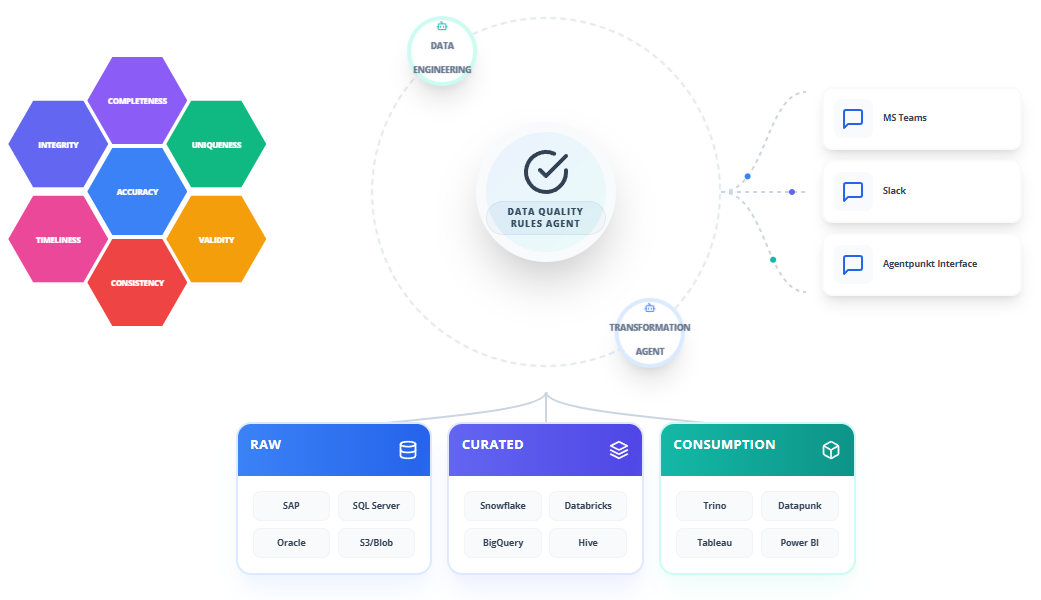
The agent natively supports several validation frameworks and formats, ensuring that your data adheres to critical standards across seven key dimensions: INTEGRITY, TIMELINESS, COMPLETENESS, ACCURACY, CONSISTENCY, UNIQUENESS, and VALIDITY.
Operational Workflow
The Data Quality Agent features an interactive, dual-pane workspace that allows QA professionals, data stewards, and data engineers to analyze datasets, define business logic, and deploy validation scripts.
Step 1: Subscribing to the Agent
Obtain access to the Data Quality Agent through the platform marketplace:
- Log in to the Agentpunkt platform.
- Search for the Data Quality Agent in the available service catalog.
- Select your preferred subscription term (7 days, 14 days, or Monthly).
- Navigate to your Hired Agents Page to manage active subscriptions.
Step 2: Workspace Session Initialization
Launch the agent to initialize your interactive workspace:
- Click "Start Session" on the Hired Agents Page next to the Data Quality Agent to open the dual-pane user interface.
- The Left Pane is your Interactive Chat & Session History, where you provide context, specify rules in natural language, and command the agent.
- The Right Pane is the Visual Workspace & Generated Code, where you inspect database schemas, review synthesized validation configurations, and copy production-ready code.
Step 3: Initiating the Profile Phase
Introduce the agent to your data landscape by providing schema definitions. Because Datapunkt does not store your live transactional data, you do not need to upload full database exports. Instead, you can copy and paste:
- A database
CREATE TABLEDDL statement. - A small CSV sample containing dummy data (5 to 10 rows).
- A list of column names, data types, and brief descriptions.
Example prompt to the agent in the Left Pane:
"Here is the schema for our customer transactions table. Please profile it and identify potential structural weak points, such as null values or anomalous patterns: [insert DDL/schema here]"
The agent will analyze the input, perform statistical profiling, and display structural patterns and anomalies in the Right Pane.
Step 4: Defining Business Rules
Once the schema is profiled, tell the agent what business rules you want to enforce. Speak in natural language, and let the agent translate it into logical constraints:
- Describe your requirements (e.g., "The transaction amount must always be positive, the customer ID must exist in our profiles table, and the discount percent cannot exceed 50% unless the customer is marked as VIP").
- The agent will process your input and respond in the Left Pane with a structured logic map.
- It maps each rule to one of the seven key dimensions: INTEGRITY, TIMELINESS, COMPLETENESS, ACCURACY, CONSISTENCY, UNIQUENESS, or VALIDITY.
Step 5: Code Generation
Request the exact code output required for your data stack:
- Ask the agent to generate code for your specific frameworks, such as SQL queries, Python scripts, or Great Expectations suites.
- The agent compiles the requested scripts and displays them in the Right Pane.
- Review the code, verify the logic, and copy it directly to your clipboard.
Step 6: Integration and Monitoring
Embed the generated logic into your operational environment:
- Copy the generated files or code snippets.
- Paste them into your ETL pipelines, dbt test suites, or orchestrators like Airflow or Prefect.
- The rules will execute automatically on each run, establishing an active, continuous integrity check with real-time alerting.
Benefits: What Makes It Good?
- Rapid Speed to Deploy: Decreases testing setup from 3 months of manual coding to 5 minutes of automated translation and code generation.
- Declarative Rules Mapping: Bridges technical and non-technical stakeholders by letting users specify rules in natural business language.
- Diverse Export Frameworks: Generates production-ready code in multiple structures (SQL, Python, Great Expectations), removing the need for manual script drafting.
- Continuous Operational Health: Embeds validation alerts directly into orchestrators, protecting downstream applications from bad data.