
Data Engineer Support Agent - Complete User and Deployment Guide
Welcome to the official user and deployment guide for the Data Engineer Support Agent. This document provides senior data engineers, DevOps specialists, data scientists, and engineering leaders with an exhaustive breakdown of the agent's capabilities, setup procedures, and daily operations.
By automating repetitive data engineering tasks, this agent transforms deployment lifecycles from three months of manual provisioning into a swift five minute automated pipeline, slashing manual workloads by 70% and increasing pipeline efficiency by over 45%.
1. Executive Summary and Value Proposition
Modern data ecosystems are complex, distributed, and highly expensive to run. Senior engineering hours are frequently consumed by pipeline upkeep, manual Infrastructure-as-Code (IaC) configuration, and post-mortem log debugging.
The Data Engineer Support Agent acts as an autonomous, 24/7 co-pilot that resolves these operational bottlenecks.
Core Impact Metrics
- Deployment Acceleration: Shrunk from days or weeks to under five minutes.
- Workforce Efficiency: Recovers up to 95% of highly-qualified employee time spent on manual configuration.
- Operational Scale: Enables teams to manage over 140 pipelines and scale capacity tenfold without expanding engineering headcount.
- Technical Debt Reduction: Automatically enforces unified styling, optimization guidelines, and documentation from day one.
2. Core Capabilities and Technical Architecture
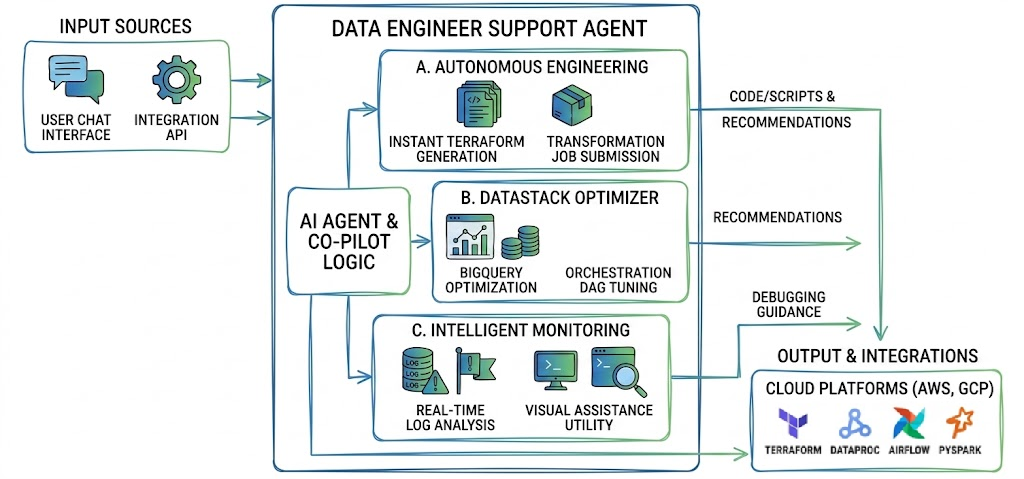
The agent functions across three primary operational domains: Autonomous Engineering, DataStack Optimization, and Intelligent Monitoring.
A. Autonomous Engineering and IaC Generation
Deploying cloud infrastructure requires highly specialized knowledge of security, network routing, and resource provisioning. The agent automates this work entirely.
- Instant Terraform Generation: The agent writes complete, production-ready Terraform scripts for both Amazon Web Services (AWS) and Google Cloud Platform (GCP). It automatically calculates correct configurations for services like VPCs, IAM policies, and subnet routes.
- No Manual Configuration: It replaces complex cloud consoles with clean code. It defines security groups, defines variables, and structures files according to DevOps best practices.
- Transformation Job Submission: You can prompt the agent to package and submit your processing jobs directly to container registries or managed cloud resources, cutting deployment time down to minutes.
B. DataStack Optimizer (Performance Tuning)
Operational inefficiencies in databases and orchestrators can result in massive cloud spend. The agent actively monitors and analyzes these systems to maximize throughput while minimizing resource consumption.
- BigQuery and Dataflow Optimization: The agent identifies expensive, unpartitioned queries or suboptimal streaming windows, suggesting exact partition keys, clustering layouts, and streaming buffer sizes to minimize query costs.
- Orchestration Workflow Tuning: It analyzes Airflow and Cloud Composer DAGs (Directed Acyclic Graphs). It evaluates execution paths, task dependencies, and concurrency parameters to remove bottlenecks and balance execution loads.
C. Intelligent Monitoring and Companion AI
Debugging failing data pipelines in real time is stressful and slow. The agent acts as a proactive companion embedded in your development lifecycle.
- Real-Time PySpark Log Analysis: By reading your pipeline logs, the agent instantly detects JVM crashes, memory allocation errors, serialization issues, and data drift anomalies.
- Context-Aware Visual Assistance: Through a 24/7 live screen-sharing utility, the agent analyzes active IDE sessions or cloud consoles to guide you through complex debugging processes step by step.
3. Privacy, Security, and Data Handling
Enterprise data architectures require strict security boundaries. We have designed our system to respect your corporate data rights completely.
- Zero-Data Storage Commitment: We do not store any of your raw data, pipeline source code, or queried schema structures. Once your active session terminates, the processed logs and intermediate structures are cleared from memory.
- Read-Only Inspection: For performance optimization and log analysis, the agent works purely on an inspection model. It suggests fixes and generates code for you to execute, ensuring it never makes destructive changes to your production environments without explicit, manual permission.
4. Step-by-Step Workflows
To help you get started, here are three essential workflows demonstrating how to interact with the agent during typical engineering operations.
Workflow A: Generating a Terraform Module for a GCP/AWS Transformation Job
- Open your session on the Hired Agents page.
- In the chat interface, describe your target architecture.
- Example prompt: "I need a Terraform configuration to deploy a Python PySpark job on GCP Dataproc. The job must read from a secured GCS bucket, process the data, and load it into a partitioned BigQuery table. Include IAM service accounts and lease-privilege access rules."
- The agent will process your request and generate a complete
.tfmodule in your session interface. - Review the generated scripts, configure your local environment variables, and run
terraform applyto provision your entire resource stack in under five minutes.
Workflow B: Debugging an Airflow DAG and Optimizing BigQuery Cost
- Copy your failing DAG file or paste your query execution plan directly into the chat.
- Example prompt: "Our daily Airflow DAG is taking over two hours to complete because of this specific BigQuery step. Here is the SQL query and the current DAG definition."
- The agent analyzes the DAG file to identify execution bottlenecks, checking for unoptimized task sequences or improper pool allocations.
- It rewrites your SQL query to incorporate efficient partitioning and clustering keys.
- Paste the updated code into your repository to see an immediate drop in cloud runtimes and data-scan costs.
Workflow C: Real-Time PySpark Log Troubleshooting
- If a spark job fails with a generic error, capture the trailing log messages from your terminal or console.
- Paste the log stack trace into your Agentpunkt chat, or enable the screen-sharing utility in your IDE.
- The agent scans the JVM thread dumps, finds the specific root cause (such as an out-of-memory driver error or a mismatched library version), and provides the exact code modifications or Spark submission flags needed to fix the issue.