
Deep Research
At its core, Deep Research is a significantly more advanced reasoning Large Language Model (LLM) within the Legalpunkt platform. While the standard Co-Counsel engine handles everyday legal queries with speed and accuracy, Deep Research operates on an entirely different level — think of it as elevating from a capable associate to a senior investigator who refuses to leave a single thread unpulled. It processes your request with deeper analytical rigor, examines broader evidentiary landscapes, and constructs its conclusions with the kind of methodical precision that complex legal matters demand.
What Makes Deep Research Different
The distinction between a standard query and a Deep Research query is not just one of speed or volume — it's a fundamental difference in how the system reasons about your question.
When you submit a prompt through the standard Co-Counsel, the system retrieves relevant materials, synthesizes a response, and delivers it within seconds. Deep Research, on the other hand, treats your prompt as the opening brief of an investigation. It breaks down your inquiry into its constituent legal questions, determines what sources and authorities are needed to resolve each one, and then methodically works through them — validating references, cross-checking precedent, and reconciling conflicting positions before presenting its findings.
The result is a structured, citation-backed deliverable that reads less like a chatbot response and more like a memorandum drafted by someone who genuinely understands the stakes of the matter at hand.
Key characteristics of the Deep Research model:
- Superior Reasoning Depth: Deep Research doesn't settle for the first plausible answer. It evaluates competing interpretations, weighs the strength of authorities, and identifies gaps in the evidentiary record — much like a seasoned litigator preparing for oral argument.
- Investigative Persistence: Where a standard query might return a general overview, Deep Research pursues the question to its logical conclusion. It traces statutory amendments, reviews judicial commentary, and examines how courts in different jurisdictions have treated analogous provisions.
- Structured, Professional Output: The final deliverable is organized as a comprehensive legal brief — complete with cited authorities, risk assessments, and actionable recommendations — ready for client presentation or internal strategy sessions.
When to Apply
Deep Research is best suited for complex tasks that require extensive exploration, structured thinking, and exhaustive analysis. You should consider using Deep Research in the following scenarios:
- Finding Jurisdictional Evidence: When you need to locate obscure local precedents, trace statutory variations across jurisdictions, or uncover specific regulatory exceptions and authorities.
- Deep Analysis and Synthesis: When a query cannot be answered by a simple summary, and requires analyzing conflicting legal arguments, weighing the strength of case law, or synthesizing multiple complex legal principles.
- Highly Complex Contexts: When your case contains intricate facts, multiple interconnected commercial agreements, or dense regulatory structures, and you require the system to capture miniscule details without overlooking subtle nuances.
- Active Need for Deep Reasoning ("Thinking Time"): When the problem requires the AI model to perform multi-step planning, verify its own assumptions, cross-reference its initial findings, and resolve contradictions before outputting a conclusion.
- Preparing Presentation-Ready Deliverables: When you need a highly detailed, citation-backed legal memorandum, risk assessment, or audit preparation document that can be shared directly with senior partners or clients.
Using Deep Research in the Workspace
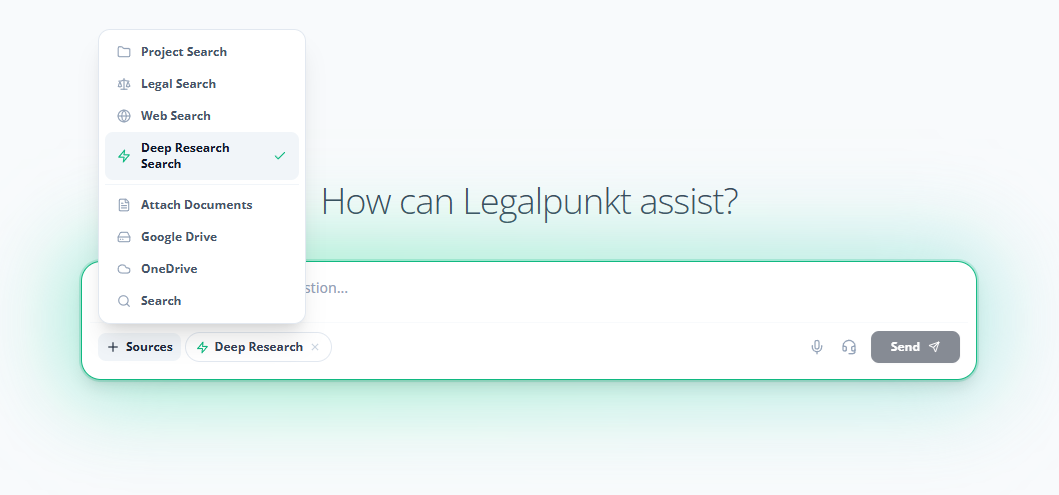
You can initiate a Deep Research query from either the Global Chat or a Project-Specific Chat interface. The process is straightforward:
- Open your chat workspace (Global or Project).
- Locate the input bar at the bottom of the window.
- Click the Plus (+) icon on the left side of the input bar to expand the Sources Engine menu.
- Select the Deep Research Search option (indicated by the Zap icon).
- Type your research question into the input field and press Send.
NOTE
Because the Deep Research model applies significantly more analytical depth to your request, responses typically take between 1 to 3 minutes to generate. A live progress indicator will display which phase of the investigation the system is currently executing.